Project 5: Virtual Memory
At the end of Project 4, your processes ran at EL0, the hardware stopped them from executing privileged instructions, and they could reach the kernel only through system calls. But one big hole is left: memory. Every process can still read and write all of physical memory—its own slot, every other process’s slot, the kernel’s code, data, and stacks, and the device registers. Your per-process kernel stacks protect the kernel from a process’s bad stack pointer, but nothing stops a process that deliberately writes to kernel memory. And every process must fit into one fixed-size, contiguous slot of physical memory.
In this project, you will close that hole by turning on the CPU’s memory management unit (MMU). You will build page tables that translate the virtual addresses a program uses into physical addresses, move your kernel to a high virtual address, and give every process an address space of its own: a process can then see only the memory that its page table maps, with exactly the permissions that the kernel chose. In CS 1690/2670, you will then turn on the CPU’s caches, and learn how the caches and the ARM memory model affect an OS that runs on real hardware.
By the end of this project, the diabolical programs that take down your OS as it exists today will be stopped by the hardware and killed by your kernel, while everything else keeps running.
This project is challenging! Virtual memory is a difficult concept to understand and implement, and comes with weird bugs that are especially tricky to pin down. You should not underestimate the required work for this project: while each quest only requires a modest number of lines of code, these lines are conceptually dense and require a lot of thought to get right. You should start early, and ask for help if you get stuck.
Learning objectives
After completing this project, you will be able to:
- Explain the issues that motivate virtual memory. You will be able to describe problems that arise without memory protection, the issues of contiguous memory allocation, and motivate address translation in the context of fragmentation and relocation.
- Explain the memory API. You will gain an appreciation for the address space abstraction, understand what makes memory virtualization transparent to the user, and justify what and where the user should have access to.
- Explain the mechanism of address translation. You will be able to walk through single- and multi-level page tables manually and in code and understand each step of a page fault in ARM64 and how hardware accelerates translation mechanisms.
- Explain how permissions are enforced in virtual memory. You will gain an understanding of page permissions both generally and their specific complexities on ARM64.
- (CS 1690/2670) Explain how caches and the ARM memory model affect an OS. You will turn on the CPU’s caches, keep memory consistent between the CPU, the GPU, and instruction fetch (with the barriers that this takes), and measure what the caches buy you.
CS 1670 vs. 1690/2670
As in the previous projects, all students share the same core project, but students in CS 1690/2670 complete extra work and run their code on real hardware.
Here is a summary of the quests you must complete for this project, based on which course you’re enrolled in:
| CS 1670 | CS 1690/2670 |
|---|---|
| Complete quests 1–4 in QEMU (emulated Raspberry Pi). | Complete quests 1–4 in QEMU (emulated Raspberry Pi). |
| Complete quest 5: caches and the ARM memory model. | |
| Run your OS on real hardware (Raspberry Pi). |
Diabolical programs
The structure of this assignment will revolve around a set of “diabolical” programs, each designed to push on the limits of your current memory management and break parts of your operating system. For each quest, we’ll ask you to run a diabolical program or set of diabolical programs, then implement some functionality that fixes the issues they cause.
The new diabolical programs are called diab_vm01 through diab_vm12. Their source code is in user/diabolical/ (diab_vm01.c to diab_vm12.c), next to the diabolical programs from Project 4, and the Makefile builds them like any other program in that directory. You start them from your terminal by name, like any other program.
We provide you with a list of possible diabolical behaviors these programs provide, but it’s up to you to read them and identify which program is doing what.
Among other things, the diabolical programs:
- follow a null pointer;
- read or write the memory of other processes, or check whether two processes really have separate memory;
- write to a device’s registers;
- use a very large amount of memory;
- read and write kernel memory, both directly and through system calls;
- run instructions that they wrote into memory themselves;
- recurse until they run out of stack;
- jump into the kernel’s code.
You are encouraged to change program functionality to help you dissect what the programs are doing, but you must turn in your assignment with the original diabolical programs. By the end of this assignment, your OS should work just fine despite their presence.
Roadmap
Quests 1–4 build on each other, and are required for everyone. Quest 5 is for CS 1690/2670 students only.
| Task | What you build | What you learn |
|---|---|---|
| 1. Diabolical processes | Nothing code-wise: you’ll read the diabolical programs, work out what each one does, and predict what virtual memory will do to it | What misbehaving processes can do to an OS without memory protection, and which part of a virtual memory system stops each kind of misbehavior |
| 2. Lost in translation | A physical page allocator, and functions that create, fill in, and walk multi-level page tables, with tests (including on a synthetic page table that we provide) | How multi-level page tables are organized, how to split up addresses into page table indices, and how to manually and mechanically walk the page table |
| 3. Remapping the kernel | Your kernel boots at high virtual addresses (with a boot page table that we provide), and then runs on a page table of its own, built with your Quest 2 code; and your exception handlers explain page faults | Why kernels live in the upper half of the address space, how a kernel turns on the MMU, and how to read a page fault |
| 4. Give me some (address) space! | You will give each process its own address space and page table(s) and update process switching + teardown to work with your page tables | How processes interact with their page tables, how process switching changes with the introduction of virtual memory, and how to properly tear down processes and their page tables |
| 5. Caches and the ARM memory model (CS 1690/2670 only) | Turned-on CPU caches, with the cache maintenance and barriers that keep your OS correct on real hardware | How the CPU, the GPU, and instruction fetch see memory through the caches, and when the ARM memory model lets the hardware reorder memory accesses |
Assignment Installation
You will keep working in the same private GitHub repository you used for Projects 1–4.
To pull in the new files for this project (the new diabolical programs, a new kernel/vm/ directory with the files for Quest 2, and an updated build system), run the following in your project directory:
git pull handout mainIf this reports an error about an unknown remote, run:
git remote add handout git@github.com:csci1670/cs1670-f26-projects.gitand then git pull handout main again.
Merge conflicts. As in earlier projects, git pull may produce merge conflicts in files that contain both your code and ours. Resolve them by keeping your implementation and adding whatever we provide alongside it. The likely places are:
kernel/memlayout.h. We have added this project’s definitions right after the comment about Project 4’s kernel stacks, which is probably where you defined your own:KERNEL_VIRTUAL_BASEand its two conversion macros (KERNEL_PHYS_TO_VIRT()andKERNEL_VIRT_TO_PHYS()), and a comment about thekalloc()pool that you define in Quest 2. Keep them and your own definitions.Makefileanduser/procs.ld. TheMakefilenow also builds the files inkernel/vm/, anduser/procs.ldprepares your programs for Quest 4. If you have never changed these files, they should merge cleanly. If you have, take our version, and then add your changes back.
If you get stuck in a merge, git merge --abort gets you back to where you started; then come to office hours.
Once the pull is done, run make clean && make qemu, and check that your OS still builds, and boots and runs as it did at the end of Project 4. None of the new kernel code runs yet, and the new diabolical programs run only when you start them. If the build fails, check the files that you merged first.
Code Structure
As before, you write all the significant code yourself. Here are the main files that are new or change in this project (each quest’s Files: line has the complete list):
.
├── Makefile                    updated: builds kernel/vm/; Quest 3: set VM_ENABLED
├── kernel/
│   ├── linker-vm.ld            Quest 3: links the kernel at high addresses (we provide this)
│   ├── memlayout.h             Quests 2-4: the kalloc pool, KERNEL_VIRTUAL_BASE, process layout
│   ├── aarch64.h               Quest 3: page fault constants (we provide these)
│   ├── boot.S                  Quest 3: turn on the MMU, jump to the high kernel_main
│   ├── kernel.c                Quest 3: call mmu_init()
│   ├── kalloc.c, kalloc.h      Quest 2: page allocator (use our code, or write your own)
│   ├── elf.c, elf.h            Quest 4: load_elf() fills in a new page table for each process
│   ├── interrupts.c            Quest 3: report page faults with our decoder
│   ├── proc.c, proc.h          Quests 3-4: high kernel stacks, a page table per process
│   ├── scheduling.c            Quest 4: switch page tables, free them on exit
│   ├── compositor.c            Quest 4: canvases in their own memory
│   ├── uaccess.c               Quest 4: check user pointers against the page table
│   ├── drivers/fb.c            Quest 3: a high pointer to the framebuffer
│   ├── drivers/mbox.c          Quest 3: a physical address for the GPU
│   └── vm/
│       ├── mmu_macros.h        page sizes, alignment, PA <-> pointer helpers (we provide this)
│       ├── mmu_regs.h          descriptor bits, attribute sets, MAIR_VALUE (we provide this; Quest 4: add yours)
│       ├── mmu_map.c, .h       Quests 2, 4: create, map, walk, destroy, copy into a page table
│       ├── mmu_test.c, .h      Quest 2: your page table tests
│       ├── mmu_test_synth.*    Quest 2: a synthetic page table for your tests (we provide this)
│       ├── mmu_boot.S          Quest 3: the boot page table; turns on the MMU (we provide this)
│       ├── mmu_enable.c        mmu_active (we provide this)
│       ├── mmu_init.c, .h      Quests 3-4: mmu_map_kernel(), mmu_init(), kernel_pagetable (we provide the header)
│       ├── fault.c, .h         Quest 3: decode and print page faults (copy these from our repository)
│       ├── cache.S, cache.h    Quest 5 (CS 1690/2670): cache maintenance
│       ├── tlb.S, tlb.h        Quest 3: TLB maintenance (we provide this)
│       └── mmu_switch.S, .h    Quest 4: switch page tables (we provide this)
└── user/
    ├── procs.ld                Quest 4: separate code and data segments, from 64 KiB up (we provide this)
    └── diabolical/diab_vm*.c   Quest 1: diab_vm01 to diab_vm12, the new diabolical programs (we provide these)
Building and running
Nothing changes: make qemu, make qemu-fb, make qemu-ws, their -gdb variants, make qemu-verbose, and make clean work as they did in Project 4. The build now also compiles the files in kernel/vm/.
make qemu-verbose is especially useful in this project, because QEMU logs every exception, and that includes every page fault. An instruction or data abort appears in the log with its ESR and, on a ...with FAR 0x... line, the address that the CPU tried to access—even when your own fault handler does not get far enough to print anything. Appendix A of Project 4 shows you how to read the log.
ARM64 page tables are at the heart of this project. Appendix A collects their details: the format of virtual addresses and descriptors, how the hardware walks your page tables, what each permission bit does, how to read a page fault, and when you must flush the TLB. Each quest tells you which parts of it to read.
Quest 1: Diabolical processes
Files: user/diabolical/diab_vm01.c through user/diabolical/diab_vm12.c (read only), docs/vm-diabolical.pdf.
Overview
This assignment will focus on adding a properly functioning paged virtual memory system to your OS, using the CPU’s memory management unit (MMU). Up until now, your operating system hasn’t been properly protected against badly behaving processes—we’ve just been trusting that our userspace processes wouldn’t mess with us. This assignment breaks that assumption. In this quest, you will:
- Read the source code of the diabolical programs
diab_vm01throughdiab_vm12, and work out what each of them does. - Predict what should happen to each of them once your virtual memory system is complete, and which part of that system makes it happen.
Why are we doing this?
Up until now, you’ve been running an unprotected operating system on the memory level. Where privilege separation got you somewhere, there are a whole myriad of ways to exploit a kernel without address translation and protection mechanisms. As virtual memory systems are difficult to debug, it’s important that you comprehend the adversarial patterns that these diabolical programs exhibit so you have a better mental model while trying to fix them.
Your predictions also give you a checklist for the rest of the project. In Quest 4, you will run every diabolical program on your finished virtual memory system, and compare what happens with what you predicted here.
What you need to do
Part A: know your enemy
You have been given a set of diabolical programs, just like in Project 4. The difference is that these programs don’t tell you what they do: you need to work it out from their source code. The list of behaviors above tells you what kinds of misbehavior to look for, but not which program does what.
Task: Work out what each diabolical program does, and what should happen to it.
Make a copy of our diabolical programs table (use File > Make a copy, and edit your copy). It has a row for each of
diab_vm01throughdiab_vm12.Read the source code of each program in
user/diabolical/, and fill in its row of the table. Three of the programs start a helper program:diab_vm07startsdiab_vm07_child,diab_vm08startsdiab_vm08_child, anddiab_vm09startsdiab_vm09_child. Read each helper along with the program that starts it, and describe both in that program’s row.- What it does. What does the program try to do? Which memory does it read, write, or jump to, and why is that a problem for an OS without virtual memory, like your OS as of now? Be specific: name the addresses or regions involved, not just “it accesses bad memory”.
- Expected behavior with virtual memory. What should happen when you run the program once your virtual memory system is complete, and which mechanism is responsible? For example, the program might touch an address that has no mapping, or that a descriptor’s permission bits forbid, or it might pass a pointer that a system call rejects.
Download your copy of the doc as a PDF, and commit it as
docs/vm-diabolical.pdf.
Hints
- Not every program should end up killed. Depending on what it does, a program might be killed with a page fault, see a system call fail and return an error, not start at all (when your kernel cannot set up its address space), or run normally without harming anything else.
- Some programs only do damage to another process. Think about what happens to a second process that runs at the same time.
- To check your reading, you can run the programs on your OS. Boot it with
make qemu-fb(ormake qemu-ws), start a graphical program or two from your terminal (for exampleclock &andpong &), and then start one diabolical program at a time. Some of them take down your whole OS, so restart QEMU before you try the next one. Note thatdiab_vm06won’t work in QEMU (it requires a real UART device), and thatdiab_vm09may take a while to run.
🤖 AI use/coding: NOT allowed. Please do the reading and thinking yourself, and fill in the worksheet yourself.
Why?
There is no code to write. The point of this task is for you to understand how the lack of memory isolation and virtual memory can cause problems, and what the categories of problems to watch out for are.
For context, see the principles around AI use in CS 1670.
Check your work
- Your table has a row for each of
diab_vm01throughdiab_vm12, and both columns of every row are filled in. - Each expected behavior names the mechanism that is responsible for it.
- Your table is committed as
docs/vm-diabolical.pdf.
Quest 2: Lost in translation
Files: kernel/vm/mmu_map.h, kernel/vm/mmu_map.c, kernel/vm/mmu_test.c, kernel/vm/mmu_test.h, kernel/vm/mmu_test_synth.c and kernel/vm/mmu_test_synth.h (provided: mmu_test_generate_synth_pt()), kernel/kernel.c, kernel/kalloc.c and kernel/kalloc.h (use our code, or write your own), kernel/memlayout.h (define the kalloc() pool), kernel/vm/mmu_regs.h (read), kernel/vm/mmu_macros.h (read).
Overview
You will be implementing multi-level page tables for a paged virtual memory system. Before we get into actually mapping your kernel using them or enforcing protections, we need to have an address translation mechanism. In this quest you will:
- Learn about the ARM64 page table format.
- Design an API for managing page tables.
- Set up a physical page allocator, and implement your API: functions that create page tables, map virtual pages to physical pages, and walk a page table in software to translate a virtual address into a physical address.
- Test your functions, both on page tables that they build and on a synthetic page table that we build for you.
Why are we doing this?
Address translation is the core mechanism of your virtual memory system and will be used in all further aspects of this project. In addition, virtual memory bugs in your operating system will be especially tricky to pin down in comparison to earlier projects, as if you do not have a working address translation mechanism, any memory mapping bugs will affect your ability to debug. It is vital, then, that you understand and can justify your address translation functions well enough to isolate future bugs in this assignment.
What you need to do
Part A: reading up on page tables
Background: the ARM64 page table format
ARM64 page tables work much like the x86-64 page tables you may know from CS 300. With 4 KiB pages, the CPU translates a 48-bit virtual address through four levels of page tables: the top-level, 2nd-level, 3rd-level, and last-level page tables. Each table is one page and holds 512 descriptors of 8 bytes each. Each level uses 9 bits of the virtual address as an index into its table, and the low 12 bits are the offset into the page. A descriptor in a top-level, 2nd-level, or 3rd-level table holds the physical address of the next table down. A descriptor in a last-level table holds the physical address of a page, together with bits that say who may access the page, and how. The CPU finds the top-level table through the TTBR0_EL1 register.
Appendix A has the details. Before you design your page table API in Part B, read its sections on the virtual address format, the hardware page table walk, and descriptor formats, including the worked example. The macros in kernel/vm/mmu_regs.h match the descriptor bits described there.
Two more resources help you practice. The translation worksheet from lecture walks you through translating addresses by hand. The page table calculator splits any virtual address into its four indices and its offset, and decodes any last-level descriptor bit by bit. (The calculator shows ARM’s level numbers, L0 to L3, next to our names for the levels.)
A note on naming conventions. Different sources number the levels of a page table differently. If you took CS 300, you probably became familiar with a convention that went from L4 (top level) to L1 (bottom level). The ARM manual takes it the other way: level 0 (top level) to level 3 (bottom level). And Linux calls them PGD, PUD, PMD, and PTE.
To avoid confusion, this handout uses descriptive names instead: the top-level page table, the 2nd-level page table, the 3rd-level page table, and the last-level page table. Watch out when you read the ARM manual: since it counts from 0, our 2nd-level table is ARM’s “level 1” table, and our last-level table is ARM’s “level 3” table. Appendix A has a table that lines up all the names.
Part B: your page table management API
It’s important to think about the API your kernel needs in order to manage page tables before you write any code.
You are welcome to implement your page table management and address translation code with whatever API you want. In particular, you should add whichever helper functions you find useful! However, at its core, every paged virtual memory system contains functions that provide (i) page table creation; (ii) installation of new mappings from VAs to PAs; and (iii) page table walking in software, which translates a VA into a PA.
Once a page table is installed, most page table walking is done in hardware, but you will need to implement a software version for your kernel to use when it handles page faults or manually wants to translate an address.
Therefore, you’ll want functions in your API that implement the following five functionalities:
- Create a page table: allocate one zeroed page with
kalloc()(see Part C), and report failure if no page is free. - Map one virtual page to one physical page in a given page table, with given descriptor attributes. This function allocates any missing tables on the way down. It must fail, and leave the page table unchanged, if the virtual page is already mapped (a duplicate mapping) or if the mapping is invalid: for example, if either address is not page-aligned, or if the virtual address has any of bits 63:48 set (see Appendix A).
- Map a range: map a contiguous range of virtual pages to a contiguous range of physical pages. This is useful for setting up memory regions.
- Walk a page table: given a top-level page table and a VA, find the descriptor in the last-level page table (i.e., the last-level page table entry) for that VA, or report that the VA is not mapped.
- Translate a VA into a PA, using the walk: the PA is the output address of the last-level descriptor plus the VA’s offset in the page.
Why reject duplicate mappings? A mapping that replaces an existing one is almost always a bug. For example, if two segments of a program share a page (Quest 4), mapping the second segment over the first would silently drop the first segment’s page and leak it. Changing a valid descriptor also requires a TLB flush, while filling in an invalid one does not (see Appendix A). When your kernel does need to change an existing mapping (for example, to make a page read-only), it does so deliberately: it walks the page table to get a pointer to the last-level descriptor, writes the new descriptor through that pointer, and then flushes the TLB entry for that VA.
We optionally provide a suggested API below, but feel free to come up with your own.
Expand for suggested API
// Allocates a zeroed page for a new page table.
//
// returns: the new table, or nullptr if no page is free.
pagetable_t pagetable_create(void);

// Maps one virtual page to one physical page, and allocates any missing
// tables on the way down.
//
// pagetable_t pagetable: the top-level page table to add the mapping to
// uint64 va: the virtual address of the page to map (page-aligned)
// uint64 pa: the physical address of the page to map va to (page-aligned)
// uint64 attr: the descriptor attributes for the new last-level descriptor
//
// returns: 0 on success, or a negative error code if va is already mapped,
// if va or pa is invalid, or if a table cannot be allocated. On failure, the
// page table is unchanged.
int pagetable_add_mapping(pagetable_t pagetable, uint64 va, uint64 pa, uint64 attr);

// Maps a contiguous virtual range to a contiguous physical range.
//
// pagetable_t pagetable: the top-level page table to add the mappings to
// uint64 va: the virtual address where the range starts (page-aligned)
// uint64 pa: the physical address where the range starts (page-aligned)
// uint64 size: the size of the range in bytes (a multiple of the page size)
// uint64 attr: the descriptor attributes for each new last-level descriptor
//
// returns: 0 on success, or a negative error code if any page in the range
// cannot be mapped.
int pagetable_add_range_mapping(pagetable_t pagetable, uint64 va, uint64 pa,
                                uint64 size, uint64 attr);

// Walks the page table to find the last-level descriptor for va.
//
// pagetable_t pagetable: the top-level page table to walk
// uint64 va: the virtual address to look up
//
// returns: a pointer to the last-level descriptor for va, or nullptr if va is
// not mapped. To change the mapping, write a new descriptor through this
// pointer, then flush the TLB entry for va.
uint64* pagetable_walk(pagetable_t pagetable, uint64 va);

// Translates a virtual address into a physical address.
//
// pagetable_t pagetable: the top-level page table to translate with
// uint64 va: the virtual address to translate (any byte, not just the start
//            of a page)
// uint64* pa: where to store the physical address that va maps to
//
// returns: 0 on success, or a negative error code if va is not mapped.
int pagetable_translate(pagetable_t pagetable, uint64 va, uint64* pa);
Notice that every address here is a uint64! See the paragraph below about the possible choices for types to use in your API.
As you design your API, you’ll need to think about the types you use to represent virtual addresses, physical addresses, and page tables. For page tables, kernel/vm/mmu_map.h defines pagetable_t, a pointer to a table’s descriptors, which the code that we provide for Quests 3 and 4 also uses. For addresses, one simple option is to make everything an unsigned 64-bit integer (uint64), but you may find it useful to add some typedefs (e.g., vaddr_t and paddr_t) for clarity: that way, the reader of your code can tell at a glance whether an argument represents a virtual address or a physical address.
Task: Add your function declarations to kernel/vm/mmu_map.h, each with a comment that says what the function does, what its arguments mean, what it returns, and in which cases it fails. Add only declarations; don’t implement the functions yet.
🤖 AI use/coding: auxiliary use allowed for API design, but we suggest you avoid it.
Why?
A big part of OS kernel engineering is to come up with good, reusable interfaces. We want you to think about this, and if you outsource the task to AI, it will give you a standard API without you developing a sense of why that API is right.
For context, see the principles around AI use in CS 1670.
Part C: create, map, walk
Background: a physical page allocator
Your kernel will constantly need fresh pages of physical memory: for page tables (starting in this part), and, from Quest 4 on, for every page of a process’s code, data, and stack. The part of the kernel that hands out these pages is the physical page allocator. In our OS, its main function is kalloc() (“kernel allocate”).
The allocator manages a pool of physical memory that is set aside for this purpose in kernel/memlayout.h: the pages from KALLOC_BASE to KALLOC_LIMIT. Everything else in physical memory—the kernel image, the kernel stacks, and the devices—stays outside the pool and is never handed out. Once the MMU is on, the kernel reaches the pool’s pages through the high map, which maps physical address pa at virtual address KERNEL_VIRTUAL_BASE + pa (see Quest 3), so the high map must cover the whole pool.
You choose where the pool goes, by defining KALLOC_BASE and KALLOC_LIMIT in kernel/memlayout.h. Both must be page-aligned, and the pool must not overlap anything else in your memory layout: the kernel image, the initial kernel stack, the kernel stacks of processes, and your process slots (until Quest 4 removes them). It must also stay well below the top of the Pi’s 1 GiB of RAM, where the GPU keeps its own memory, including the framebuffer. Within these limits, a bigger pool lets your OS run more and bigger processes, but costs a little more bookkeeping: our implementation below uses one byte per page.
We suggest a 128 MiB pool, from 256 MiB to 384 MiB:
#define KALLOC_BASE 0x10000000   // 256 MiB
#define KALLOC_LIMIT 0x18000000  // 384 MiB: a 128 MiB pool, or 32,768 pages
This leaves the lowest 256 MiB of RAM for everything you placed there in earlier projects, and it stays far away from the GPU’s memory. Whatever you choose, check it against your memory layout diagram, and add the pool to the diagram.
Because every allocation is exactly one page, a page allocator is much simpler than a general-purpose allocator like malloc(). Any free page is as good as any other, so the pool never suffers from the external fragmentation that troubles contiguous allocation (where enough memory is free in total, but no single free region is large enough): as long as one page is free, an allocation succeeds. The price is internal fragmentation: a process that needs ten bytes still gets a whole 4 KiB page.
The allocator needs to remember which pages are free. Common designs are:
- An array or a bitmap with one entry per page, which
kalloc()scans for a free page. This is simple, and it gives every page a natural place to store more information about it (such as a reference count, if processes ever share pages), but an allocation can take time proportional to the size of the pool. - A free list that links the free pages together, with the “next” pointer stored inside each free page itself. Allocating and freeing a page take constant time, and the list needs no extra memory. The xv6 teaching OS uses a free list.
- A buddy allocator, which keeps free blocks of 1, 2, 4, 8, … pages, and splits and merges them as needed, so that the kernel can also allocate physically contiguous runs of pages (which some devices need). Linux uses a buddy allocator.
Our suggested implementation uses an array, and it starts each search for a free page right after the page that it handed out last (next fit). If every search started at the beginning of the array instead, each allocation would scan past all the pages that are already in use, and allocating many pages in a row (all of a big program’s memory, say) would take time that grows with the square of their number. Its interface, in kernel/kalloc.h, has four functions:
void* kalloc(void)returns one zeroed page from the pool, ornullptrif no page is free. The page comes back as a pointer that the kernel can use directly, not as a physical address:kalloc()converts the page’s address withmmu_pa_to_ptr()(inkernel/vm/mmu_macros.h), so it returns the right kind of pointer both before and after you turn on the MMU in Quest 3. Convert the pointer back withmmu_ptr_to_pa()before you write it into a descriptor.void kfree(void* ptr)returns a page to the pool.ptrmust be exactly whatkalloc()returned.uint64 kalloc_nfree(void)returns the number of free pages in the pool. This is handy for testing: compare it before and after an operation to find out how many pages the operation allocated, or leaked.bool is_kalloc_page(uint64 pa)returns whether the physical addresspalies in the pool. Use it to make sure that you never free a page thatkalloc()did not hand out, such as a page of the kernel image or of a device.
You can use our implementation, or write your own.
Just give me the code...
Put the following into kernel/kalloc.h:
#ifndef _KALLOC_H
#define _KALLOC_H

#include "memlayout.h"
#include "types.h"
#include "vm/mmu_macros.h"

// Number of pages in the kernel page pool
#define NPAGES ((KALLOC_LIMIT - KALLOC_BASE) >> PAGE_SHIFT)

// Allocates one zeroed page from the kernel page pool.
// Returns the page as a pointer (see mmu_pa_to_ptr in vm/mmu_macros.h), or
// nullptr if no page is free.
void* kalloc(void);

// Returns a page from kalloc to the pool. ptr is in the same form kalloc returns.
void kfree(void* ptr);

// Returns the number of free pages in the pool.
uint64 kalloc_nfree(void);

// Returns true if the physical address pa lies in the kernel page pool.
// Kernel mappings and devices lie outside the pool.
bool is_kalloc_page(uint64 pa);

#endif  // _KALLOC_H
And put the following into kernel/kalloc.c:
#include "kalloc.h"

#include "memlayout.h"
#include "utils.h"  // memset(), and your panic() helper from Project 1
#include "vm/mmu_macros.h"

// used[i] is true if the page at KALLOC_BASE + i * PAGE_SIZE is allocated.
static bool used[NPAGES];

// Where kalloc() starts looking for a free page: just after the page that it
// handed out last, so that it does not scan past all the pages in use every
// time. The search wraps around at the end of the pool.
static uint64 next;

void* kalloc(void) {
  for (uint64 n = 0; n < NPAGES; n++) {
    uint64 i = (next + n) % NPAGES;
    if (!used[i]) {
      used[i] = true;
      next = (i + 1) % NPAGES;
      void* page = mmu_pa_to_ptr(KALLOC_BASE + (i << PAGE_SHIFT));
      memset(page, 0, PAGE_SIZE);
      return page;
    }
  }
  return nullptr;
}

void kfree(void* ptr) {
  uint64 pa = mmu_ptr_to_pa(ptr);
  if (!is_kalloc_page(pa) || !PAGE_ALIGNED(pa)) {
    panic("kfree: %p is not a kalloc page", ptr);
  }
  uint64 i = (pa - KALLOC_BASE) >> PAGE_SHIFT;
  if (!used[i]) {
    panic("kfree: page %p is already free", ptr);
  }
  used[i] = false;
}

uint64 kalloc_nfree(void) {
  uint64 n = 0;
  for (uint64 i = 0; i < NPAGES; i++) {
    if (!used[i]) {
      n++;
    }
  }
  return n;
}

bool is_kalloc_page(uint64 pa) {
  return pa >= KALLOC_BASE && pa < KALLOC_LIMIT;
}
If your panic() helper is declared in a header other than utils.h, include that header in kernel/kalloc.c, too.
I want to write it myself!
Implement the four functions above in kernel/kalloc.c, and declare them in kernel/kalloc.h, using whichever design you like. Keep their behavior exactly as described above: the rest of this handout relies on it.
Hints
- Make
kfree()panic on an address outside the pool, on an address that is not page-aligned, and on a page that is already free. Each of these is a kernel bug, and you want to find it where it happens, not when a page that two parts of your kernel think they own gets corrupted much later. - If you use a free list, store physical addresses in it, and convert them with
mmu_pa_to_ptr()whenever you follow one. A pointer that you store before the MMU is on is a low address, and from Quest 4 on, low kernel addresses fault while a process’s page table is on the CPU.
Task: Set up a physical page allocator, and implement the functions you outlined in Part B!
- Set up the physical page allocator. Your page table functions get every table page from
kalloc(), so you need a working allocator first. Use our code from the background above, or write your own. Either way, defineKALLOC_BASEandKALLOC_LIMITinkernel/memlayout.h(see the background above for our suggestion), and add the pool to your memory layout diagram. If your allocator needs to be initialized (for example, to build a free list), call its initialization function fromkernel_mainbefore anything allocates a page. - Implement your page table functions. In
kernel/vm/mmu_map.c, implement the function interface either you wrote or borrowed from us. For page table walking, follow the steps of the hardware page table walk in Appendix A.
To make your life easier, a few guidelines:
- Your mapping functions should reject addresses that are not page-aligned—we’ve provided a few handy macros to make this easier in
mmu_macros.h, feel free to make use of them. Your walk and translate functions, on the other hand, should accept any address. - Your mapping function must never overwrite a valid descriptor: for a duplicate mapping, return an error and leave the existing mapping as it was.
- If a call to your mapping function fails, free any tables that it allocated on the way down.
- A walk that finds an invalid descriptor at any level should report that the VA is not mapped. Similarly, a walk of a VA with any of bits 63:48 set, which the hardware never translates through
TTBR0_EL1, should also fail. - You only need table descriptors and page descriptors. ARM64 also has block descriptors, which map 2 MiB or 1 GiB at once, but you will map everything with 4 KiB pages (unless you do extra credit Quest 3-E1).
Hints
- Descriptors hold physical addresses, but your C code needs pointers. Convert with the helpers in
mmu_macros.h: usemmu_ptr_to_pa()on a page fromkalloc()before you write it into a descriptor, andmmu_pa_to_ptr()on a descriptor’s output address before you follow it. Right now, with the MMU off, both helpers return their argument unchanged. After Quest 3, they add or removeKERNEL_VIRTUAL_BASE, and code that skips them breaks. DESC_ADDR_MASKextracts the output address from a descriptor.- Note that bit 0 (
DESC_VALID) alone does not make a descriptor valid: your walk may only follow a descriptor whose bits 1:0 are0b11(a table descriptor, or, at the last level, a page descriptor). With bits 1:0 =0b01, a descriptor is invalid in the top-level and last-level tables, and a block descriptor in the 2nd-level and 3rd-level tables, which your walk should report as not mapped, too (unless you do extra credit Quest 3-E1). The synthetic page table in Part D includes both kinds of invalid0b01descriptors. - To free the tables that a failed map call allocated, remember which tables the call created. A table that the call created is still empty when the call fails.
🤖 AI use/coding: NOT allowed.
Why?
This is the core new code you write for this project: the functions that set up and use page tables. Most other tasks will involve modifications to your existing kernel code, but this task will really make you understand how page tables work.
For context, see the principles around AI use in CS 1670.
Part D: testing, testing, 1, 2, 3
Task: Write tests for your page table functions!
You will not be able to turn on the MMU until the end of Quest 3, and the class of bugs that arise with a broken address translation mechanism can be particularly tricky to debug. So before you move on, write tests in kernel/vm/mmu_test.c that check the following:
You can create a page table and add mappings to it. Create a new top-level page table, and map a few pages into it: with different attributes, and at VAs that do and do not share tables. Each call should succeed.
Your mappings read back correctly. Walk the page table for each VA that you mapped: the last-level descriptor must hold the right PA and the right attributes, and translating any address in the page (not just its first byte) must give the right PA. A VA that you did not map must be reported as not mapped.
Duplicate and invalid mappings are rejected. Mapping a VA that is already mapped must fail, and must leave the original mapping unchanged. Mapping an address that is not page-aligned, or a VA with any of bits 63:48 set, must fail, too. A call that fails must not leak pages: compare
kalloc_nfree()(the number of free pages, inkernel/kalloc.h) before and after the call.Your walk works on a page table that you did not build. The stencil provides
mmu_test_generate_synth_pt()(inkernel/vm/mmu_test_synth.c; includevm/mmu_test_synth.hinmmu_test.cto use it), which builds a synthetic page table by hand, without using any of your functions, and returns its top-level table. It also gives you an array of test cases (struct synth_pt_case). Each case has a virtual address (va), whether a correct walk findsvamapped (mapped), and if so, the last-level descriptor that the walk finds (desc) and the physical address thatvatranslates to (pa), plus a short description (what) for your messages. Check that your walk and translate functions agree with every case:const struct synth_pt_case* cases; uint64 ncases; pagetable_t top = mmu_test_generate_synth_pt(&cases, &ncases); for (uint64 i = 0; i < ncases; i++) { // Walk and translate cases[i].va in top, compare with cases[i], and // print a pass or fail line that includes cases[i].what. }This test catches bugs that the other tests cannot find, such as if your mapping and walking functions make the same mistake (for example, if both take an index from the wrong bits of the VA). In this case, they agree with each other, but not with the hardware. The cases also include some descriptors and addresses that your own page tables may never contain, but that a correct walk must handle. Treat the synthetic page table as read-only, and never
kfree()its tables: they are part of the kernel image, not of thekalloc()pool. Its physical addresses are made up, so compare them, but never read or write memory at them.Run your tests from
kernel_main. Put all of your tests behindmmu_run_tests(), whichkernel/vm/mmu_test.hdeclares: define it inkernel/vm/mmu_test.c(which starts out empty), and have it print a pass or fail line for each test. Includevm/mmu_test.hinkernel/kernel.c, and callmmu_run_tests()fromkernel_mainbefore the first process starts.
Confirm that your tests pass before you move on to Quest 3.
Hints
- A last-level table covers 2 MiB of virtual memory (512 pages of 4 KiB), a 3rd-level table covers 1 GiB, and a 2nd-level table covers 512 GiB. Use these sizes to pick VAs that share, or do not share, a table.
- The page table calculator shows you the four indices of a VA at a glance, so you can check that your test VAs land in the tables you intended.
- Start each test from a new top-level table, so that the tests do not depend on each other.
kalloc_nfree()also lets you check how many tables your mapping function allocates. The first mapping in an empty top-level table allocates three tables (a 2nd-level, a 3rd-level, and a last-level table), and a second mapping in the same last-level table allocates none.- The synthetic page table provides a lot of tests, covering many edge cases. If you find yourself stuck on some of them, skip them and work on the others. We won’t grade you on your pass rate for these tests, but passing more of them will make your page table implementation more likely to work without bugs in later quests.
🤖 AI use/coding: allowed, including agentic coding. You can ask AI to help with the implementation of the tests, but the design of the tests must come from you. You must understand your tests fully, and be able to explain them. You must yourself fix any bugs in your implementation of the page table API functions that failing tests reveal. (In particular, you cannot just ask AI agent to write tests and use them to fix your implementation.)
Why?
Writing test fixtures is rote work that AI can easily automate, but coming up with the right tests and making your page table functions correct is hard. Make sure you use good and specific prompts here, so that the AI writes tests that actually test meaningful properties of page tables and of your implementation.
For context, see the principles around AI use in CS 1670.
Check your work
- Your tests pass.
make qemuprints a pass line for every test inmmu_run_tests(), including the test on the synthetic page table, and no fail lines. - Nothing else has changed yet. The MMU is still off, so the rest of your OS boots and runs exactly as in Project 4.
Bonus Quests (Extra Credit)
Important note: All extra credit work requires you to meet with an instructor at office hours to discuss your work in order to get credit. There will be no exceptions to this, since extra credit is strictly optional.
Quest 2-E1: Print a page table (easy)
Task (extra credit): Write a function that prints every valid descriptor (entry) in a page table, one line per descriptor, indented by level. For a table descriptor, print its index and the physical address of the next table. For a last-level descriptor, print the virtual address that it maps, its physical address, and its attributes decoded into readable flags (for example, EL0 access, read-only, UXN, PXN, and the MAIR slot). Use it to print the page tables from your tests!
Then, extend this code to generate a Graphviz .dot file that shows the page tables as a tree, with each table as a node and each descriptor as an edge to the next table or to a page. You can use Graphviz to render the .dot file into a picture of your page tables.
🤖 AI use/coding: allowed, including agentic coding. We generally allow AI for extra credit quests, but you must understand your implementation fully. To get credit, you will need to discuss your work with an instructor in person.
Quest 3: Remapping the kernel
Files: Makefile, kernel/boot.S, kernel/kernel.c, kernel/proc.c, kernel/drivers/fb.c, kernel/drivers/mbox.c, kernel/vm/mmu_init.c, kernel/memlayout.h, kernel/interrupts.c, docs/project5-quest3.md, docs/memlayout-virtual.pdf, kernel/linker-vm.ld (provided), kernel/vm/mmu_boot.S (provided), kernel/vm/mmu_regs.h (provided), kernel/vm/mmu_init.h (provided), kernel/vm/mmu_enable.c (provided), kernel/vm/mmu_switch.S and mmu_switch.h (provided), kernel/vm/fault.c and fault.h (copied from our repository), kernel/aarch64.h (provided).
Updating your code
You MUST pull our changes before you work on this quest. Our changes to the stencil code include critical changes to our build system and the provided code that you’ll need in order to get back to a working kernel. Don’t skip this section!
Pull again to get the code for Quests 3 and 4:
git pull handout mainThese updates add the code that we provide for Quests 3 and 4: a second linker script, which links your kernel at high virtual addresses (kernel/linker-vm.ld), the boot page table and the code that turns on the MMU (kernel/vm/mmu_boot.S), TLB maintenance (kernel/vm/tlb.S), switching page tables (kernel/vm/mmu_switch.S), and the header for the kernel page table functions that you write in Quest 3 (kernel/vm/mmu_init.h), with an empty kernel/vm/mmu_init.c for your code.
The Makefile now has a setting, VM_ENABLED, that chooses the linker script. It starts out as 0, which keeps linking your kernel with kernel/linker.ld, at its physical addresses, as before. So once the pull is done, make clean && make qemu should build and run your OS just as it did before the pull. You will set VM_ENABLED to 1 in Part A.
Merge conflicts. The likely places where you might run into merge conflicts are:
kernel/memlayout.h. We have addedARM_LOCAL_PERIPHERALS_LIMITnext toARM_LOCAL_PERIPHERALS_BASE, and, after the comment about thekalloc()pool,USER_MIN_VAand placeholders for the definitions that you add in Quest 4. Keep them and your own definitions.kernel/aarch64.h. We have added constants for page faults afterESR_EL1_IMM_MASK. If you added definitions of your own there, keep both.Makefileandkernel/vm/mmu_regs.h. TheMakefilehas the newVM_ENABLEDsetting, and we rewrotemmu_regs.h, which can now be included from assembly code, and providesMAIR_VALUE. If you never changed them, they merge cleanly. If you did, take our version, and then add your changes back.
Overview
In this quest, you turn on the MMU and move your kernel to its new home: the high map, at KERNEL_VIRTUAL_BASE (0x8000'0000'0000) plus each physical address. You will:
- Boot your kernel at its high addresses, with a temporary boot page table that we provide.
- Build the kernel’s own page table,
kernel_pagetable, with your page table code from Quest 2, and switch the MMU to it.
By the end of this quest, your kernel runs entirely at high virtual addresses, through your page tables, and your programs run as before. Your processes still share one page table, though, until Quest 4.
Why are we doing this?
Most operating systems put the kernel in the upper part of every address space, so that the lower part can belong to a user process and the kernel can run (e.g., on a system call) without having to switch page tables. That way, processes can use overlapping low addresses (as you will in Quest 4), and the kernel is at the same place whichever process is running. Moving the kernel to high virtual addresses first, while your processes still share one page table, lets you test your page tables on the kernel alone before things get more complex.
What you need to do
Part A: booting into the high map
In the first step, we’ll turn on the MMU and virtual memory, but use a provided minimal “boot page table”.
Background: linked high, loaded low
Once you set VM_ENABLED = 1 in the Makefile (in the task below), the build links your kernel with kernel/linker-vm.ld instead of kernel/linker.ld. This linker script links your kernel at KERNEL_VIRTUAL_BASE + 0x8'0000, meaning that all addresses embedded in the kernel code will be high addresses starting at KERNEL_VIRTUAL_BASE (0x8000'0000'0000). However, the Raspberry Pi’s firmware (or QEMU) still loads kernel8.img at physical address 0x8'0000 and jumps there with the MMU off. Yet, all addresses that the linker computed and put into the executable are “high” virtual addresses: the address of kernel_main, the function pointer in your system call table, and every pointer to a string. Those addresses only work once the MMU is on and some page table maps the virtual (high) addresses to the physical addresses where the kernel is actually loaded!
This would seem to create a conundrum: how can our kernel run at all if it is loaded at 0x8'0000 and needs page tables to work? The answer is that code that only uses addresses relative to the program counter (PC) works at either address. Branches (b, bl) are PC-relative, and so are the adr and adrp instructions, which the C compiler uses whenever your code takes the address of a function or a global variable. That is why boot.S can still work before there are page tables, but it requires using exceptional care when writing the bootup assembly code. For example, an instruction like ldr x0, =symbol loads the address value that the linker computed, which is a virtual (high) address. Calling C functions from bootup code is thus difficult: the C compiler may well have chosen to use an ldr instruction!
A common solution pursued by OS kernels is to have some minimal code that runs at low addresses, sets up a temporary page table, and then turns on the MMU and jumps to the kernel’s virtual (high) addresses. We’ll follow this approach too.
The boot page table. Before boot.S can jump to kernel_main, something must turn on the MMU with a page table that maps the kernel’s virtual (high) addresses. That page table must exist before any C code runs (which rules out using your kalloc() and pagetable_add_mapping() code to create the page table). We provide you with a very simple page table in assembly in kernel/vm/mmu_boot.S. This file, despite being a .S file, contains not just code but also data: specifically, it contains four page tables that get stored in the kernel’s .data segment. The assembler writes those out for you, so no code is needed to build them!
The figure below shows what this boot page table maps, and where in physical memory each mapping leads.
Scroll sideways to see the whole figure, or click it to open it in a tab of its own.
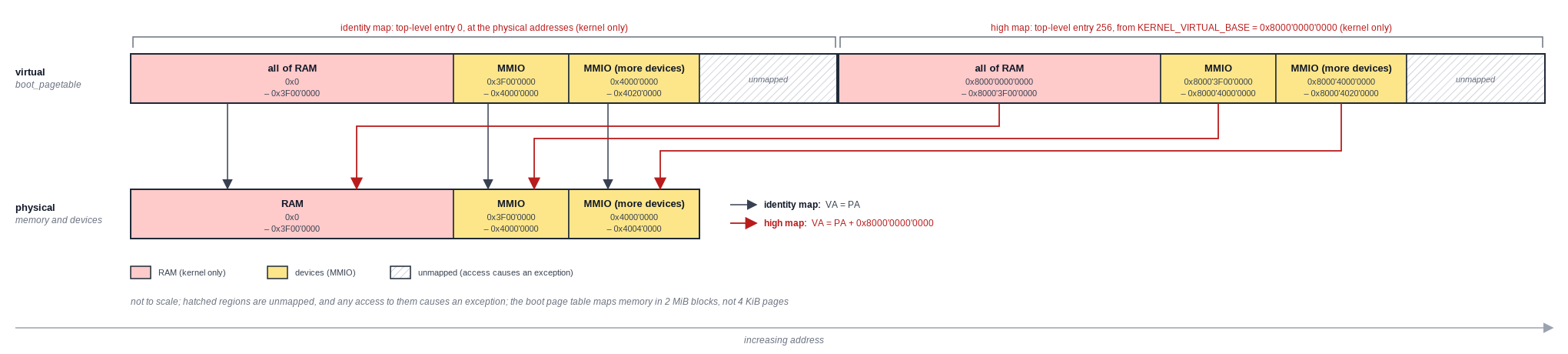
Three ideas make the boot page table so small:
- We use the same table twice. Top-level page table entries (descriptors) 0 and 256 point to the same 2nd-level table. This is an unorthodox design, but it works here: descriptor 0 covers virtual addresses 0 to 512 GiB, and descriptor 256 covers the 512 GiB from
KERNEL_VIRTUAL_BASEup. So every physical address that the boot page table maps appears twice, first at a virtual address that matches its physical address (an identity map), and atKERNEL_VIRTUAL_BASEplus the physical address (the “high map”). - The boot page table supports only kernel code. All mapped pages are accessible to EL1 only, and all RAM is executable. No process can run while the boot page table is active, since no memory is accessible to EL0.
- It uses block descriptors (“superpages”). The boot page table uses a trick to reduce its size that you can implement for extra credit, but won’t use in your “normal” page tables. In particular, a 3rd-level page table entry (descriptor) can map a whole 2 MiB block of memory directly, without a last-level table under it (see Appendix A). Such a special entry is a page descriptor with bit 1 cleared, and often referred to as a “superpage”. One 3rd-level table, with 512 descriptors, can map up to one GiB using block descriptors/superpages: this is enough to cover all of the Raspberry Pi’s RAM and its MMIO addresses for peripherals. Your own page tables will use 4 KiB pages only, although you can implement superpages for extra credit.
Turning on the MMU. mmu_boot_enable() (in the same file, kernel/vm/mmu_boot.S) enables the MMU and page tables by writing to several system registers. In particular, it sets the TCR_EL1 system register with the translation settings from TCR_VALUE (48-bit virtual addresses, 4 KiB pages, TTBR0_EL1 is used), and sets the MAIR_EL1 system register to configure two memory types (normal RAM and device memory). It then sets TTBR0_EL1 to the physical address of boot_pagetable, flushes the TLB, sets the M bit in SCTLR_EL1 (this enables the MMU), and sets the global mmu_active variable to true. The function therefore returns with the MMU enabled, but it returns to the low (physical) address it was called from. This happens because once the MMU is on, the CPU translates the address of every instruction it fetches. This includes the next instruction after enabling the MMU, which is still at a low address. The code still works because the boot page table also includes the identity map.
What changes in your kernel. From the moment boot.S jumps to kernel_main, your kernel runs at high addresses. This means that every pointer that the compiler or linker made for you must refer to virtual (high) addresses. But there are some pointers your kernel builds from physical addresses: your kernel stacks (from KSTACKS_BASE), and your framebuffer (from the address that the GPU returns). These work under the boot page table, which maps everything twice, but kernel_pagetable (Part B) maps only the high map, so you will convert them. The opposite goes for the GPU, which knows nothing about your page tables: the mailbox needs the physical address of its buffer, so you will change mbox_call() (in kernel/drivers/mbox.c) to convert the framebuffer’s address back into a physical address before passing it to the GPU.
In the first step, we will set up some error reporting that will help you debug page faults once the MMU is on. Page faults occur very easily when you work on code related to virtual memory, so you may end up seeing your fair share of these errors!
Task: Set yourself up for enabling virtual memory.
- Read the background section above (you may want to peek at the new
kernel/linker-vm.ld, how it differs fromkernel/linker.ld, and the newkernel/vm/mmu_boot.Sas part of this). - Make your exception handlers report page faults. This is important because messages more specific than a generic kernel panic will help you debug issues that come up with the rest of quests 3 and 4.
- Decoding a page fault from the exception registers is mostly looking up bits in tables, so we provide a page fault decoder in this repository: copy
fault.handfault.cfrom it intokernel/vm/(fault.hdescribes the two functions). - In your handler for synchronous exceptions from EL0 (Project 4), call
fault_decode()with the values ofESR_EL1andELR_EL1, before your handler does anything that could fault again. If it returnstrue, the exception was a page fault: print the process’s PID and name, as in your Project 4 kill message, callfault_print(), and kill the process as before - In your handler for synchronous exceptions from EL1, do the same, but
panic()instead of killing a process. You will not see a page fault until the MMU is on, but from then on, every page fault tells you what went wrong, and where. Appendix A explains how to read these messages.
- Decoding a page fault from the exception registers is mostly looking up bits in tables, so we provide a page fault decoder in this repository: copy
Show me an example
In your handler for synchronous exceptions from EL0, if esr holds the value of ESR_EL1, ctx points to the process’s saved registers, and p is the process:
  struct fault f;
  if (fault_decode(esr, ctx->elr_el1, &f)) {
    printf("[kernel] killed pid %d (%s): ", p->pid, p->name);
    fault_print(&f);
    // ... and kill the process, as for any other exception from EL0
  }
This prints lines like this one (your addresses depend on your layout):
[kernel] killed pid 3 (diab_vm01): translation fault at ARM level 3 (last-level table): EL0 read from 0x0000000000080000, pc 0x00000000000100c0🤖 AI use/coding: allowed, including agentic coding. The changes to your fault handlers are mostly mechanical, and AI can help you write them.
Now, we are ready to actually turn on the MMU and boot into the high map.
Task: Boot your kernel into the high map.
- In the
Makefile, changeVM_ENABLED = 0toVM_ENABLED = 1. From now on, the build links your kernel withkernel/linker-vm.ld, at high addresses. Your kernel will not boot again until you have changed yourboot.S(the next two steps), since those addresses only work once the MMU is on. - Modify your
boot.Sto do the following. First, after you zero.bssand before you set up the stack, callmmu_boot_enable. Second, point the stack pointer (sp) at the high address of your initial kernel stack (INITIAL_KERNEL_STACK + KERNEL_VIRTUAL_BASE), and jump to the high address ofkernel_main. Remember that loading addresses to jump to is a bit tricky: rather than jumping withbl, useldrto load the address to jump to andbrto jump there (this ensures that the jump is to an absolute address).
I want to write it myself!
Great! You’ll need at least five instructions: a bl, two ldr/mov pairs (or equivalent), and a br. Remember that ldr xN, =expression can load any 64-bit constant, including a sum of two constants from memlayout.h.
Just give me the code...
Replace the lines in your boot.S that set up the stack and call kernel_main with:
    // Turn on the MMU with the boot page table (vm/mmu_boot.S).
    bl  mmu_boot_enable

    // Run on the high address of the initial kernel stack, and jump to the
    // address that the linker gave kernel_main, which is high.
    ldr x0, =(INITIAL_KERNEL_STACK + KERNEL_VIRTUAL_BASE)
    mov sp, x0
    ldr x0, =kernel_main
br x0- Check the rest of your
boot.Sfor anyldr xN, =symbolthat runs before the jump: with the MMU off, it loads an address that does not work yet. If you have such lines, useadroradrpinstead. - Make the pointers that your kernel builds from physical addresses use virtual addresses from the high mapping: in particular, you need to adjust the address for the start of each process’s kernel stack, and the address in
fb->pixelsin your framebuffer setup code (e.g.,fb_init()). (Leave the process slots alone: they stay at their physical addresses until Quest 4 because we’ll use an identity mapping for them for now.) - Make
mbox_call()(inkernel/drivers/mbox.c) give the GPU the physical address of its message buffer. The GPU knows nothing about your page tables, but the buffer is now at a high virtual address, like everything else in your kernel. Convert the address withmmu_ptr_to_pa()fromkernel/vm/mmu_macros.h.
Help me with this code change!
Add this line to the #includes at the top of kernel/drivers/mbox.c:
#include "vm/mmu_macros.h"Then, in mbox_call(), replace the line that builds the message,
uint32 msg = ((uint32)(uint64)buf & ~0xFu) | (MBOX_CH_PROP & 0xFu);with:
  // The GPU knows nothing about our page tables: it needs the buffer's
  // *physical* address, not the (high) virtual address that buf holds.
  uint64 pa = mmu_ptr_to_pa((uint64*)(uint64)buf);
uint32 msg = ((uint32)pa & ~0xFu) | (MBOX_CH_PROP & 0xFu);- Call your code that sets up the exception vector table (i.e., sets
VBAR_EL1) right afteruart_init()inkernel_main, so that your exception handlers can report faults related to page tables rather than your kernel just hanging. - Run
make qemu. Your kernel should boot and print as before, and then the first process is killed with a permission fault on its first instruction fetch. This is expected: the boot page table maps no pages with permissions that allow EL0 to use them. We’ll fix this in Part B.
Hints
- If your kernel hangs right after
mmu_boot_enable,make qemu-verboseshows you the exception, and itsFAR. - To change the address of the start of a process’s kernel stack, consider applying the
KERNEL_PHYS_TO_VIRT()macro inkernel/memlayout.h. - In GDB,
break kernel_mainworks as before: the breakpoint is at a high address, and the CPU gets there with the MMU on. To step throughboot.Sbefore the MMU is on, tell GDB where the kernel really is:add-symbol-file kernel/kernel8.elf -o -0x800000000000. - Your kernel may well work without the change to
mbox_call(), because the cast touint32inmbox_call()happens to drop bit 47, which is the only bit thatKERNEL_VIRTUAL_BASEsets. But that is an accident, and it would break with any otherKERNEL_VIRTUAL_BASE!
🤖 AI use/coding: auxiliary use allowed. You may use AI to understand the boot page table, high map, and how the bootup assembly must work. However, you should not have AI implement the changes for you, as you need to understand how your kernel boots and activates the MMU. Critically, you must also know how the kernel uses virtual address from the “high map” and when it must convert back to physical addresses.
Part B: the kernel’s page table
Now that we have the kernel running on top of the boot page table, let’s build a real page table for the kernel’s use. We will refer to this as “the kernel page table” (kernel_pagetable) in this handout. The kernel only uses this page table in a few select situations—before the first process runs, and when a process exits—but it is critical to have it for these situations.
Background: what the kernel page table maps
In this part, you will replace the boot page table with a page table of your own that maps only what the kernel needs, in 4 KiB pages: the MMIO addresses at their physical addresses, your process slots at their physical addresses (for now), and the kernel’s own memory in the high map. The figure below shows an example, including the canvases that Quest 4 will add to the high map. Note that your own kernel page table might differ, since your physical addresses for some components (e.g., kernel stacks, process slots, framebuffer, and kalloc() pool) may be different.
Scroll sideways to see the whole figure, or click it to open it in a tab of its own.

Again, this is an example of one possible layout, not the layout that your kernel must have! Your kernel stacks, process slots, and kalloc() pool (and, in Quest 4, your canvases) may be at different physical addresses, depending on the memory layout that you chose, and your framebuffer is wherever the GPU put it. At the end of this part, you will draw a diagram of your own layout.
Background: normal and device memory
Every page has a memory type:
- RAM is normal memory: the CPU may cache it, and may reorder and combine accesses to it, which is harmless for RAM (in most cases).
- MMIO addresses are device memory: reading or writing one can have side effects (e.g., reading the UART’s data register), so the CPU must always access them as given in your code (e.g., without any possible caching). The framebuffer must also be considered device memory, because the GPU reads it directly from memory, not through the CPU’s caches.
An ARM64-specific detail is that a page table entry (descriptor) does not directly store the memory type itself, but it instead stores an index (AttrIndx) into the MAIR_EL1 register, which holds up to eight memory types. Our provided mmu_boot_enable() loads MAIR_EL1 with MAIR_VALUE from kernel/vm/mmu_regs.h: index 0 (MAIR_IDX_NORMAL) is for normal memory (RAM), and index 1 (MAIR_IDX_DEVICE) is for MMIO addresses. Of the attribute sets in mmu_regs.h, DESC_DEV_PAGE_ATTR uses device memory, and all the others use normal memory (see Appendix A for details).
Background: the TLB
The TLB caches translations. When you change or remove a valid page table entry (descriptor) in a page table that the CPU might use, the TLB may still hold the old translation. Hence, you must remove (“invalidate”) the TLB entry (Appendix A has a table of exactly when you need to do this). TLB invalidation code is written in assembly, as it needs direct control over registers and must use special instruction unavailable from C code. We provide functions for this in kernel/vm/tlb.S:
tlb_flush_all()invalidates every translation; andtlb_flush_va(va)only the translations for the page that containsva.
Another helper we provide, mmu_switch_pagetable() (in kernel/vm/mmu_switch.S) switches the MMU to use another page table and flushes the whole TLB as it does so.
In this part, you build the kernel page table before it is active and then switch to it, so you do not need to flush the TLB yourself yet. You’ll need to actively flush the TLB in Quest 4.
Task: Implement code to create the mappings for the kernel page table, and switch to your kernel pagetable.
0. Check your memory layout.
The high map starts at KERNEL_VIRTUAL_BASE (0x8000'0000'0000, defined in memlayout.h), far above any physical address, so it has room for all of the Raspberry Pi’s memory: physical address pa appears in the high map at KERNEL_VIRTUAL_BASE + pa. Check your memory layout diagram: the kernel code and data, the initial kernel stack, the kernel stacks of processes, your process slots, and the kalloc() pool (KALLOC_BASE to KALLOC_LIMIT in memlayout.h; see the page allocator background in Quest 2) must not overlap.
1. Implement a helper function to create the mappings in the kernel’s high map.
The header file kernel/vm/mmu_init.h declares the functions and symbols that you need for this, and we suggest writing this code in mmu_map_kernel(pagetable) in kernel/vm/mmu_init.c. This function should add the kernel’s mappings to the page table pagetable provided in the argument, using your Quest 2 functions. It should map:
- The high map (at
KERNEL_VIRTUAL_BASEplus the physical address). If you are unsure what you need to map, check the figure above and/or the hints below! For now, set the flags/attributes for most of the pages to the values inDESC_KERN_PAGE_ATTR(normal memory, readable and writable, accessible from EL1 only, executable), but those for the framebuffer should useDESC_DEV_PAGE_ATTR(device memory, readable and writable, accessible from EL1 only, not executable). These are temporary permissions; you will differentiate in a more fine-grained way in Quest 4. - The peripherals, at their physical MMIO addresses (so that your drivers’ addresses still work), with
DESC_DEV_PAGE_ATTR. This includes the peripherals outside the CPU (PERIPHERALS_BASEtoPERIPHERALS_LIMIT) and the peripherals inside the CPU (“ARM local peripherals”,ARM_LOCAL_PERIPHERALS_BASEtoARM_LOCAL_PERIPHERALS_LIMIT).
Return 0, or the error code of the first mapping that fails.
Hints
You need to map:
- the kernel code and data segments, from the physical address of
kernel_begin(a symbol defined bylinker-vm.ld, declared inkernel/vm/mmu_init.h; like every symbol, its value is a high address, so useKERNEL_VIRT_TO_PHYS()) tokernel_end; - the ELF executables embedded into the kernel image (from
kernel_endtokernel_image_end); - your initial kernel stack;
- the kernel stacks of all
NPROCprocesses; - the
kalloc()pool, which holds every page used by the system (including those for page tables); and - the framebuffer, with flags specified by
DESC_DEV_PAGE_ATTR.
Some things to pay attention to:
- If your initial kernel stack is near the end of the kernel image, you can map both at once, up to
INITIAL_KERNEL_STACK. - Your kernel learned the framebuffer’s physical address from the mailbox in
fb_init(); it ispitch * height * 2bytes long (two halves), rounded up to a whole page.
2. Implement a function that creates the actual kernel page table.
- Define a global variable called
kernel_pagetable(kernel/vm/mmu_init.hdeclares it), and define a new function (e.g.,mmu_init()) that adds the kernel’s mappings to it withmmu_map_kernel()in a new function. If that fails, there is nothing sensible to do but panic. - Add new mappings for your process slots (
PROC_STARTtoPROC_START + NPROC * PROC_SIZE) that identity-map them inkernel_pagetableat their physical addresses. These 1:1 mappings allow processes to run again without having per-process page tables yet. Each mapping should be readable, writable, and executable from EL0 (use theDESC_RWX_PAGE_ATTRflag set frommmu_regs.hfor this). You will remove this temporary region again in Quest 4, when each process gets its own page table. - Switch to
kernel_pagetablewith the providedmmu_switch_pagetable(mmu_ptr_to_pa(kernel_pagetable)).
3. Call your function in kernel_main, right after fb_init() (so that you know where the framebuffer is), and before anything that draws on the screen, uses a process slot, or starts a process.
At this point, your userspace programs should all be back to running as normal!
Hints
kalloc()returns virtual address pointers (asmmu_activeis already set), and both the boot page table andkernel_pagetablemap the kalloc pool in the high map. That is why you can buildkernel_pagetablewhile the boot page table is active and keep using it after the switch.fb_init()runs under the boot page table, which maps all of RAM, including the GPU’s memory.kernel_pagetablemaps only what you tell it to!- If your kernel faults right after the switch, the faulting address (
FAR) tells you which region you forgot to map.make qemu-verboseshows it even if your fault handler does not get far enough to print it. - A 128 MiB pool is 32,768 pages, so your kernel will take a moment to map all of them.
🤖 AI use/coding: NOT allowed. This is the core of setting up your OS’s virtual memory scheme, and it builds upon the page table functions you wrote in Quest 2. Ideally, you just call them with the rigth arguments and everything works! We want you to understand the mappings that your kernel needs and that are active then it runs.
We now have a long-running virtual memory view for the kernel set up that matches the picture in the background section above. But this means that your long-maintained memory diagram for your OS is no longer fully accurate. You’ll update it in the next task.
Task: Draw a virtual memory layout diagram, and update your physical memory layout diagram as needed.
Draw the virtual layout of your kernel_pagetable as a new diagram and commit it as docs/memlayout-virtual.pdf. It should show every region that your mmu_map_kernel() and mmu_init() map: the high map at KERNEL_VIRTUAL_BASE (and what is in it), the peripherals, and the process slots. Label each region with the virtual addresses where it starts and ends in your kernel.
Also update your physical layout in docs/memlayout-physical.pdf as necessary.
🤖 AI use/coding: NOT allowed. This is purely a diagram-drawing task, so there is no code involved.
Check your work
Now check the following:
- Make sure that your OS boots into your terminal as in Project 4, and your programs, windows, and keyboard all work.
- Comment out the high map of the
kalloc()pool inmmu_map_kerneland boot. The kernel should panic with a translation fault at a high address, right after the switch tokernel_pagetable. Think about which level the message names, and why the walk fails at that level: which tables does the pool’s high map share with the rest of the high map? After verifying this, undo the change. - Run the diabolical programs again. Those that read or write the kernel’s memory at its physical addresses or access a device’s registers should now be killed with a page fault, because
kernel_pagetablemaps neither kernel memory nor the MMIO region for EL0. Others still succeed, as we haven’t isolated processes from each other yet.
Bonus Quests (Extra Credit)
Important note: All extra credit work requires you to meet with an instructor at office hours to discuss your work in order to get credit. There will be no exceptions to this, since extra credit is strictly optional.
Quest 3-E1: Fewer tables with block mappings ("superpages") (moderate difficulty)
Task (extra credit): Map the kernel’s high map and the peripherals with 2 MiB block descriptors (“superpages”) in 3rd-level tables, as the boot page table does, rather than with 4 KiB pages in last-level tables, wherever a region is 2 MiB-aligned, covers a whole block, and has the same attributes throughout. (Appendix A describes block descriptors and the levels that may hold them; in a block descriptor, bit 1 is 0.) Make sure that your page table walk handles block descriptors correctly, and that every other function that visits your page tables also does.
Compare the number of table pages that kernel_pagetable uses before and after (kalloc_nfree() can help you here), and explain why fewer, larger mappings can also make the TLB more effective.
🤖 AI use/coding: allowed, including agentic coding. We generally allow AI for extra credit quests, but you must understand your implementation fully. To get credit, you will need to discuss your work with an instructor in person.
Quest 4: Give me some (address) space!
Files: kernel/elf.c, kernel/elf.h, kernel/proc.c, kernel/proc.h, kernel/init.c, kernel/kernel.c, kernel/scheduling.c, kernel/syscall.c, kernel/compositor.c, kernel/uaccess.c, kernel/interrupts.c, kernel/memlayout.h, kernel/vm/mmu_init.c, kernel/vm/mmu_map.c, kernel/vm/mmu_map.h, kernel/vm/mmu_regs.h, docs/vm-permissions.md, kernel/vm/mmu_switch.S and mmu_switch.h (provided), kernel/vm/tlb.S and tlb.h (provided), user/procs.ld (provided).
Overview
Processes need their own address spaces, and we’d like to move away from contiguous allocation and memory mapping. In this quest, you will:
- Build a new page table for each process when it starts, with the kernel’s mappings in it.
- Switch page tables when your scheduler switches processes.
- Free a process’s page table and memory when it exits.
- Properly set permissions in your page tables, so that badly behaving processes fault and get killed.
- Check the pointers that processes pass to system calls against their page tables.
Partway through this quest, processes will no longer be contiguously allocated. By the end, a process that touches memory that it should not access will result in an exception and your kernel will kill it.
Why are we doing this?
The core idea of virtual memory is that every address generated by a user program is a virtual address. What this means, functionally, is that user processes don’t have to think about the underlying memory layout when they want to allocate memory. They can trust that, in the physical memory underneath, the kernel will find space for their allocation. Up until now, this guarantee hasn’t held even though we’re using address translation because processes don’t have their own page tables! In this quest, you will give each process its own address space and then enforce permissions over the mappings in this address space for security.
What you need to do
Part A: one address space per process
Background: what is in a process’s address space
Every process gets its own top-level page table, and with it an address space of its own, with the same layout for every process. Programs are now loaded at the virtual addresses that they were linked at (from 0x1'0000; see user/procs.ld), so every program uses the same addresses, and no two processes can see each other’s memory.
The kernel is in every address space. Whenever a process runs, its page table is active (i.e., in the CPU’s TTBR0_EL1 register), and it stays active when the process takes an exception, caused by, e.g., a system call, a page fault, or a timer interrupt. The kernel code that runs after the exception, its stack, and everything that it touches must be mapped in the process’s page table, too. That includes more than you might think: for example, the compositor runs in the timer interrupt, with whichever process’s page table is on the CPU, and copies every process’s canvas to the framebuffer.
So every process’s page table gets the same kernel mappings as kernel_pagetable: you add them with the same function, mmu_map_kernel(), that you used earlier to create kernel_pagetable. These mappings are copies of other mappings: each page table contains its own mappings for the high map pages. That is simple, but it costs memory (with a 128 MiB pool, about 90 table pages per process), and it only works because the kernel’s mappings never change after mmu_init(). (Bonus Quest 4-E2 explores how real kernels share these tables instead.)
Canvases used to live in the process slots, which this quest removes. We suggest giving them a region of physical memory of their own instead: this region contains NPROC canvases of CANVAS_SIZE bytes, one for each process table entry, from an address defined as CANVASES_BASE. The kernel (and the compositor) reach every canvas through the high map, and a process that asks for a canvas gets its own canvas mapped at USER_CANVAS_BASE in its address space. The process and the kernel then use different virtual addresses for the same physical memory.
The figure below puts all of this together: it shows an example of one process’s page table, and where in physical memory each of its mappings leads.
Scroll sideways to see the whole figure, or click it to open it in a tab of its own.

Again, this is an example: the addresses in your kernel depend on the layout that you choose in kernel/memlayout.h (and on where your kernel stacks and canvases are in physical memory), and the pages that hold a process’s code, data, and stack are wherever kalloc() found free pages.
Here’s a version of the virtual address space (show from low addresses at the top to high addresses at the bottom) with the relevant constants from kernel/memlayout.h filled in:
  0x0000'0000'0000  +---------------------------------+
                    | nothing (a NULL pointer faults) |
  USER_MIN_VA       +---------------------------------+  0x1'0000  (start of process code)
                    | the program: code and read-only |
                    | data, then data and bss         |
                    +---------------------------------+
                    | ...                             |
  USER_CANVAS_BASE  | its canvas, if it asks for one  |
                    | ...                             |
                    | the MMIO peripherals (EL1 only) |  0x3F00'0000
                    | ...                             |
                    | (unmapped guard page)           |
                    | process stack                   |
  USER_STACK_TOP    +=================================+  KERNEL_VIRTUAL_BASE
                    | the kernel's mappings: the high |
                    | map, as in kernel_pagetable     |
                    | (EL1 only)                      |
  0xFFFF'FFFF'FFFF  +---------------------------------+
Now, let’s add virtual address spaces for processes. The first step is to do some design work, and then we’ll lay some groundwork for the code that will implement it.
Task: Figure out your virtual address space layout for user processes.
Choose your a virtual address space layout for processes based on your OS’s existing conventions.
As part of this, you should define USER_CANVAS_BASE, USER_STACK_TOP, USER_STACK_SIZE, CANVASES_BASE, and CANVAS_SIZE in kernel/memlayout.h, and add the process layout to your virtual memory layout diagram in docs/memlayout-virtual.pdf.
No virtual memory regions should overlap, every userspace-accessible address must be below KERNEL_VIRTUAL_BASE, and the canvas region must be outside the kalloc() pool. CANVAS_SIZE must be a multiple of the page size, and big enough for a struct canvas and the pixels of your largest window (316x236 pixels at 32 bpp is about 300 KB).
Hints
- As an example, our reference implementation puts the process’s canvas in its virtual memory at 256 MiB (
0x1000'0000), gives it a 128 KiB growing downwards fromKERNEL_VIRTUAL_BASE, and puts the process canvases in physical memory where the process slots originally were (0x6'0000).
🤖 AI use/coding: auxiliary use allowed. You can ask AI to help you with the design, but you must understand it and document it yourself in your virtual memory layout diagram.
Once you have a design, it’s time to add a few pieces of code that we’ll need to track and create per-process page tables.
Task: Prepare your kernel for per-process page tables.
Add a field to the process descriptor (
struct proc) to track where the process’s top-level page table is.Add the canvases (
CANVASES_BASEtoCANVASES_BASE + NPROC * CANVAS_SIZE) to the high map inmmu_map_kernel().Write a helper function that lets you copy data into the virtual memory of another process. This is important because your kernel’s loader will need to populate a process’s address space with the program’s code and data, but it cannot simply write to the process’s virtual addresses: the process’s page table is not active yet, so those addresses are not valid yet.
We recommend creation a helper function such as
copy_to_address_space()inkernel/vm/mmu_map.c, and to declare it inkernel/vm/mmu_map.h:// Copies n bytes from kernel memory at src to virtual address va in the // address space of the page table `pagetable`, which does not have to be active. // // returns: 0 on success, or -1 if a page of [va, va + n) is not mapped in // pagetable (in which case the bytes before that page may have been copied). int copy_to_address_space(pagetable_t pagetable, uint64 va, const void* src, uint64 n);Copy the data page by page: find each page’s physical address with your
pagetable_translate()function, and write to it through the high map (mmu_pa_to_ptr()).
🤖 AI use/coding: auxiliary use allowed. You can use AI to help plan, code, and debug your copy_to_address_space() function, but you must understand how it works. You may not use AI to edit the process descriptor or map the canvases.
With these pieces in place, we can now attack the main goal of this quest. This part involves editing the ELF loader that we gave you in Project 1, which you extended in Projects 2–4. Since you did not write this code, it may be somewhat difficult to understand. If you have questions, please do ask on EdStem or come to office hours.
Task: Give every process an address space of its own.
- Change your
load_elf()inkernel/elf.cso that it fills in a new page table for the process, rather than loading into the process’s slot.
Here's what you need to change
The steps below refer to the loader that we gave you in Project 1, which you extended in Projects 2–4 (if you wrote your own, you should make the equivalent changes):
load_elf’s arguments. It no longer needs the address of the process’s slot: make the signatureint load_elf(struct elf_header* ehdr, struct proc* p), returning 0 on success and-1on failure. Delete thememset()that zeroes the slot, askalloc()already zeroes every page.- The checks. Where the loader checks the ELF header and the program headers, return
-1instead of callingpanic(): a program that we cannot run should fail to start, not crash the kernel. - Before the loop over the program headers, create the process’s top-level page table, and add the kernel’s mappings to it with
mmu_map_kernel(). - In the loop, for each
PT_LOADsegment: next to the existing checks, check that the segment lies betweenUSER_MIN_VAandUSER_CANVAS_BASE. Then, instead of thememmove()into the slot, map a freshkalloc()page at each page of[p_vaddr, p_vaddr + p_memsz), and copy the segment’sp_fileszbytes from the ELF file into them withcopy_to_address_space(). Delete thememset()that zeroes the bss, askalloc()has zeroed it already. - After the loop, map fresh pages for the stack, at addresses prior to
USER_STACK_TOP. - Relocations. Delete the call to
apply_relocations()(see below for why). - The first saved context. Save the page table in
struct proc.ELR_EL1is nowe_entryitself, without a slot address added, andSP_EL0isUSER_STACK_TOP. - For now, map every user page with the same attributes as your process slots in Quest 3 (EL0 can read, write, and execute it). Part D will give each page the permissions it needs.
- If anything fails, return
-1. (For now, it’s okay to leak pages that you allocated; Part C will provide you with teardown code that handles this properly.)
- Update your
spawn()code to no longer compute a memory slot for the process and callload_elf(elf, p). Ifload_elf()fails, free the process table entry, and makespawn()return-1. - Move the canvases out of the process slots. In your
init_canvascode, use the process’s canvas in the canvas region: zero it (it may hold the last owner’s pixels), map it atUSER_CANVAS_BASEin the process’s page table (readable and writable, but not executable, by EL0), and fill in itsstruct canvasthrough the kernel’s (high-map) pointer, with the process’s address of the pixels. ReturnUSER_CANVAS_BASEto the process, and keep the kernel’s pointers instruct procfor the compositor. - Remove the process slots from
kernel_pagetable(inmmu_init()), fromkernel/memlayout.h, and from anything else that still uses them (for example, a test ofuser_range_ok()that you wrote in Project 4; Part E rewritesuser_range_ok()itself).
Why are there no relocations to apply any more? Until now, the linker had to relocate pointers inside our programs’ code and data segments based on the address of the process’s slot (basically, adding the start address of that slot to every pointer). Now every program runs at the addresses it was linked at (from 0x1'0000) and in its own virtual address space, so it can just use the plain addresses stored inside the program’s executable as virtual addresses (since they cannot be used by any other process). Your loader has nothing left to do because virtual memory made relocation unnecessary!
Hints
- If some of step (1) reminds you of work you did for WeensyOS in CS 300, that is accurate! This is the loader copying step that you completed in that project.
- You cannot test this part until Part B is done: a process runs with its own page table only once the scheduler switches to it.
- Two segments in an ELF executable can share a page. Check whether a page is already mapped before you allocate it!
user/procs.ld(provided) puts code and read-only data in one segment (flags R+X) and data and bss in another (R+W), each starting on a new page.- Nothing in a program is linked below 0x1'0000, so leave the lowest
64 KiB of every address space unmapped, and refuse a
PT_LOADsegment that starts belowUSER_MIN_VA, so that no program file can map page 0. - If you add a mapping to the page table that is currently active (as
init_canvasdoes), calltlb_flush_va()for the new page: the TLB holds no old translation for it, but the barriers make sure that the hardware table walker sees your new descriptor.
🤖 AI use/coding: auxiliary use allowed. You can ask AI to help you pinpoint what code needs to change, but you need to make the changes yourself. You can also use AI to understand the ELF loader and what it does.
Part B: switching processes
Now that each process has its own page table, we must make sure that the kernel switches to the right page table before running the process.
Task: Before a process runs, make your scheduler switch to the process’s page table.
- Call the provided
mmu_switch_pagetable()inresume()(or whichever function in your scheduler restores a process’s saved context), beforerestore_context. Pass it the physical address of the process’s top-level page table: usemmu_ptr_to_pa(p->pagetable)(or the equivalent for your field). - Test Part A: your programs, windows, and keyboard should now all work again!
Hints
- Switch for every process, including
idle, and including a process that resumes inside a system call. Aread()that blocked still copies keystrokes into its caller’s memory when it wakes up, so that process’s page table must be active again. - If your
init()starts the first process without going through that function, switch there, too.
🤖 AI use/coding: NOT allowed. This task requires very few lines of code (one or two), but is critical to making your OS actually use the page tables it created. We’d like you to do this manually so that you understand what is happening to make the processor switch between different virtual memory views (i.e., address spaces).
Part C: teardown
Processes now run with their own page tables, but we don’t define what should happen when a process exits (in fact, it currently just leaks its page table and memory). In this part, you will implement a teardown function that frees a process’s page table and memory when it exits.
Task: Free a process’s address space when it exits.
- Implement a teardown function, such as
pagetable_destroy(pagetable),, inkernel/vm/mmu_map.c(and declare it inmmu_map.h). - When a process exits, switch to
kernel_pagetable, and then destroy the process’s page table. - In Project 4, your exception handler started killing a process through the
exitcode with status-1. Make sure that it tears down the page table, too! - Use your teardown function to handle failures in
load_elf(), so that it frees everything it allocated when it fails. - Think about these questions (you do not need to write down your answers):
- Why must you switch to
kernel_pagetablebefore you destroy the exiting process’s page table? - Why is it fine that the kernel is still running on the exiting process’s kernel stack while it destroys the process’s page table?
- Why must you switch to
Hints
- The teardown function should free every table page of the page table, and every page that the lower half of the address space maps and that came from
kalloc()(useis_kalloc_page()for this). It should not free any page that the upper half maps, as those are the kernel’s pages, including every page of thekalloc()pool. - Canvases and peripherals are not
kalloc()pages, either, so don’t free them. - If this part of the assignment reminds you of the “exit” step of WeensyOS in CS 300, that is accurate! The teardown function is similar to the cleanup code you wrote for that project.
🤖 AI use/coding: auxiliary use allowed. You may use AI to help you implement the teardown function and the code to destroy page tables (which is largely a set of loops over the page table contents). You must understand, however, why the kernel must switch to a different page table in this code.
Part D: permissions
We’re almost there, but we still need to set up one key piece of the virtual memory puzzle: page permissions. Right now, nearly every page that a process can reach is readable, writable, and executable from EL0. This means that a process can, for example, execute pages that constitute the stack (a big no-no to avoid buffer overflow attacks). In this part, you will tighten permissions such that processes can only access the memory they need.
Task: Figure out what permissions are needed.
Before you write any code, copy this table into
docs/vm-permissions.mdand fill it in. For each region, choose what EL1 and EL0 may do with it (any combination of read, write, and execute, or nothing), and its memory type (normal or device):Region EL1 EL0 Memory type Kernel code Kernel read-only data, and the embedded user programs Kernel data and bss, the initial kernel stack, the kernel stacks The kalloc()pool (which holds every page table)The canvases, in the high map MMIO addresses and the framebuffer User process code and read-only data User process data and bss The user process’s stack The user process’s canvas, at USER_CANVAS_BASEThe page below the user process stack, and everything below USER_MIN_VACompare your table with the flag/attribute sets in
kernel/vm/mmu_regs.h, and define any that you want to use, but which are missing there.
🤖 AI use/coding: auxiliary use allowed. Fill in the table on your own first. You can check your understanding and answers with AI, but we want you to think about this on your own first.
Now that you have a plan, it’s time to implement it.
Task: Give every page the least access it needs.
- In
mmu_map_kernel(), map each part of the kernel image with the correct permissions (“attributes”). Our new linker script inlinker-vm.ldstarts each part on a new page, and defines a symbol for each boundary (kernel/vm/mmu_init.hdeclares them): the kernel’s code is fromkernel_begintotext_end, its read-only data torodata_end, its data and bss toelf_executables_begin, and the embedded user programs tokernel_image_end. - In
load_elf(), choose each segment’s attributes from its ELF flags,p_flags:PF_X(0x1, executable),PF_W(0x2, writable), andPF_R(0x4, readable). Add these definitions to yourkernel/elf.hif it does not have them. The loader should refuse a segment that is both writable and executable. - Leave the page below the user stack unmapped, so that a stack that grows too far faults instead of running into other memory.
- Run every diabolical program again, and compare what happens with your predictions from Quest 1 in
docs/vm-diabolical.pdf!
Hints
- AP bit 6 decides whether EL0 can access a page at all, AP bit 7 makes the page read-only. Appendix A explains how these bits combine with UXN and PXN.
- The hardware never lets EL1 execute a page that EL0 can write.
- Table descriptors (in top-level, 2nd-level, and 3rd-level tables) also have permission bits (APTable, UXNTable, and PXNTable; see Appendix A), but you can just leave them as zero.
- User programs are linked at 0x1'0000, and nothing is mapped below it. What happens when a process follows a
NULLpointer? And what would happen when the kernel does, while a process’s page table is on the CPU? - If your kernel faults on its own code or data once you have split the image, check which part
FAR_EL1is in, and which attributes you gave that part.
🤖 AI use/coding: auxiliary use allowed. You can use AI to help you with the changes to the ELF loader. You must handle the kernel mappings (which you wrote) on your own.
Part E: do not trust user pointers
Finally, we need to do a bit of housekeeping to make sure that security measures we put in place in Project 4 (to handle “confused deputy” attacks) still work now that we have removed the process slots. In Project 4, user_range_ok() checked that a pointer passed to a system call was inside the process’s memory slot. Now that processes have their own page tables, we need to check that every page that a pointer touches is mapped in the process’s page table and has the right permissions.
Task: Check every pointer that a system call receives against the process’s page table.
- Rewrite
user_range_ok()inkernel/uaccess.cto use your page table walking function(s). Each page that the range touches must be mapped in the current process’s page table and accessible from EL0. Keep your existing checks for overflow and forn == 0. - For
copy_to_user(), also make sure that each page is writable from EL0. Giveuser_range_ok()an argument for this, or write a second function. - After the check, copy through the user’s virtual address directly. During a system call, the calling process’s page table is active.
- Make sure that
copy_str_from_user()checks each new page that the string reaches.
🤖 AI use/coding: allowed, including agentic coding. You can use AI to help you with the changes to user_range_ok() and copy_to_user(), but you must understand how they work and why they are necessary for security.
Check your work
Run make qemu-fb (or make qemu-ws), and check that:
- Everything still works. Your OS boots into your terminal as in Project 4, and you can start text and graphical programs from it; your windows and the keyboard work as before.
- The diabolical programs are stopped. Run every diabolical program again (as in Part D). Each one that touches memory it should not is killed with a page fault message that names it, and the rest of your system keeps running. Compare this with your predictions in
docs/vm-diabolical.pdf. If a program does not behave as you predicted, find out whether your prediction or your kernel is wrong. - Exiting frees everything. Print
kalloc_nfree()when a process exits (e.g., withDEBUG()in your exit code), and startsquaresfrom your terminal several times: the number of free pages should be the same after each run. - Bad pointers are refused. Write a small test program that calls
write(1, (void*)0x80000, 16)(your kernel’s physical address, which no process’s page table maps) andwrite(1, (void*)0x800000080000, 16)(your kernel’s code in the high map, which EL0 cannot access). Each call should return-1, and your kernel should neither print its own memory nor crash.
Bonus Quests (Extra Credit)
Important note: All extra credit work requires you to meet with an instructor at office hours to discuss your work in order to get credit. There will be no exceptions to this, since extra credit is strictly optional.
Quest 4-E1: Keep the TLB across context switches with ASIDs (moderate–high difficulty)
Task (extra credit): Give every process its own address space identifier (ASID), as described in the background on ASIDs, so that switching page tables no longer has to flush the whole TLB. Mark user pages as not global (nG = 1) and kernel pages as global, write the process’s ASID into TTBR0_EL1 together with the address of its top-level page table (in your own version of mmu_switch_pagetable()), and flush that ASID’s translations (tlbi aside1is) before you give the ASID to a new process. Check how kernel/vm/mmu_boot.S sets TCR_EL1 to find out how many bits an ASID has, and which TTBR it comes from.
Measure the difference on a Raspberry Pi: how long does a context switch take with and without the full TLB flush?
🤖 AI use/coding: allowed, including agentic coding. We generally allow AI for extra credit quests, but you must understand your implementation fully. To get credit, you will need to discuss your work with an instructor in person.
Quest 4-E2: Share the kernel's half of every address space (moderate difficulty)
Task (extra credit): Instead of copying the kernel’s mappings into every process’s page table, share them, as the boot page table shares its 2nd-level table between two top-level descriptors. The kernel’s mappings all live in the upper half of the address space, under top-level descriptors 256–511 of kernel_pagetable, so a new process’s page table can simply copy those descriptors, and use the same 2nd-level (and lower) tables as kernel_pagetable. Make sure that pagetable_destroy() never frees a shared table.
Measure how many pages a process’s page table uses before and after. What would go wrong with the copying approach if the kernel added a mapping to kernel_pagetable after some processes had started? Does that still go wrong with sharing?
🤖 AI use/coding: allowed, including agentic coding. We generally allow AI for extra credit quests, but you must understand your implementation fully. To get credit, you will need to discuss your work with an instructor in person.
Quest 4-E3: Demand paging (moderate–high difficulty)
Task (extra credit): Make your loader lazy: instead of allocating and filling every page of a program when the process starts, allocate each page only when the process first touches it. In load_elf(), record each PT_LOAD segment, and the stack, as a region of the process’s address space in struct proc: its range of virtual addresses, its attributes, and where its contents come from (bytes of the ELF file, which stays in the kernel image, followed by zeroes). Map none of its pages. When the process takes a translation fault (the struct fault from fault_decode() has its type and address) at an address in one of its regions, allocate a page, fill it, map it with the region’s attributes, and return to the faulting instruction, which then runs again (see Appendix A). A fault anywhere else, including in the guard page below the stack, and every permission fault, still kills the process.
Watch out for two things:
- A page can hold the end of a segment’s file data and the start of its bss. Copy only the bytes that the file has for that page, and leave the rest of the page zero.
- The kernel touches user memory, too. A
read()into a buffer that the process has not touched yet must still work, souser_range_ok()must accept a page that is not mapped but lies in one of the process’s regions, and map it before the kernel copies to or from it.
Compare how many pages each of your programs ends up with under eager loading and under demand paging (count the pages in its page table when it exits, say), and find out which pages it never touches. Real kernels demand-page programs from disk, so that a program can start running before all of it has been read. Our programs are in memory already, in the kernel image: what does demand paging gain our OS, and what does it cost?
🤖 AI use/coding: allowed, including agentic coding. We generally allow AI for extra credit quests, but you must understand your implementation fully. To get credit, you will need to discuss your work with an instructor in person.
Quest 4-E4: fork() and exec() (moderate–high difficulty)
Task (extra credit): Add the two system calls that Unix uses to start programs, instead of spawn(). Number them 100 or higher (see our ABI specification), and declare them for user programs in user/lib/u_syscalls.h.
int fork(void)creates a child process that is a copy of the caller, and returns twice: the child’s PID in the parent, and 0 in the child. The child gets a new page table with the kernel’s mappings, and in it a copy of every user page of the parent that came fromkalloc(), at the same virtual address and with the same attributes. It also gets a copy of the parent’s descriptors (increase each one’s reference count), and a copy of the parent’s saved user registers on its own kernel stack, so that it starts out by returning from the same system call. The child starts without a window: do not copy the parent’s canvas, and leaveUSER_CANVAS_BASEunmapped in the child.int exec(const char* name)replaces the caller’s program with the program calledname. The process keeps its PID, its parent, and its descriptors, but gets a new address space, and gives up its window and canvas as inexit(). On success,exec()does not return: the process starts over at the new program’s entry point. If there is no such program, or it cannot be loaded,exec()returns-1, and the caller continues unchanged. So copy the name into the kernel first (it is in the address space that you are about to throw away), and build the new address space completely before you destroy the old one. You may need to split yourload_elf()for this.
If you have done Quest 4-E3, the child also needs a copy of its parent’s regions.
Test the two calls with a program that forks a few children, each of which changes a global variable, prints it, and then exec()s another program, while the parent checks that its own copy of the variable has not changed, and wait()s for every child. Once they have all exited, kalloc_nfree() should be back where it started. Why does Unix split starting a program into two system calls, where we had one (spawn())? Think about what a shell can do in the child between fork() and exec().
🤖 AI use/coding: allowed, including agentic coding. We generally allow AI for extra credit quests, but you must understand your implementation fully. To get credit, you will need to discuss your work with an instructor in person.
Quest 4-E5: Copy-on-write fork() (high difficulty)
Task (extra credit): This quest builds on Quest 4-E4. Most children that fork() creates call exec() right away, which throws away every page that fork() has just copied. Make fork() copy nothing but page tables: the parent and the child share every user page, and a page gets copied only when one of them first writes to it.
- In
fork(), map each of the parent’s user pages in the child at the same physical address. Make each writable page read-only in both page tables, and mark it as copy-on-write with a software bit. Pages that are read-only anyway (the program’s code) can simply be shared. The parent’s page table is on the CPU while it forks, so flush the TLB entries of the parent’s pages that you made read-only. - Keep a reference count for each page in the
kalloc()pool (an array ofNPAGEScounters works well): the number of page tables that map it.pagetable_destroy()frees a page only when its count drops to 0. - When a process takes a permission fault on a write to a copy-on-write page, give it a page of its own. If others still share the page, allocate a new page, copy the shared page into it, map the copy in its place (writable, and no longer copy-on-write), and decrease the shared page’s count. If the process is the page’s last user, just make the page writable again. Then return to the faulting instruction. A write to a page that is read-only but not copy-on-write still kills the process.
- The kernel writes to user memory, too, and a copy-on-write page is read-only for EL1 as well. Before
copy_to_user()writes to a copy-on-write page, give the process its own copy (the writability check inuser_range_ok()is a good place for this), or the kernel takes the permission fault itself.
Appendix A’s note on break-before-make explains why the order of your steps matters when you replace a shared page with its copy.
Measure how long a fork() followed by an exec() takes, and how many pages it allocates, with your eager fork() and with copy-on-write. When is copy-on-write slower than an eager copy?
🤖 AI use/coding: allowed, including agentic coding. We generally allow AI for extra credit quests, but you must understand your implementation fully. To get credit, you will need to discuss your work with an instructor in person.
Quest 5 (CS 1690/2670 only): Caches and the ARM memory model
Files: kernel/aarch64.h, kernel/vm/mmu_init.c, kernel/vm/mmu_regs.h, kernel/vm/cache.S and cache.h (new), kernel/drivers/mbox.c, kernel/drivers/fb.c, kernel/compositor.c, kernel/elf.c, user/pi.c, user/pong.c, docs/vm-caches.md.
Overview
So far, your OS has run with the CPU’s caches turned off: mmu_boot_enable() (in kernel/vm/mmu_boot.S) turns on the MMU, but leaves the data and instruction caches off. This is simple and safe, but slow, because every load, store, and instruction fetch goes all the way to RAM. In this quest, you will turn on the CPU caches, fix some problems that can now occur, and measure what the caches buy you. On real hardware, this requires you to understand who else looks at memory besides your code’s loads and stores—the GPU and the CPU’s own instruction fetch—and in which order the hardware lets them see your stores. In this quest, you will:
- Measure your OS with the caches off, and then turn the caches on.
- Keep memory that devices access consistent with the CPU’s caches and ensure that all caches are cleared when necessary.
- Measure again, and explain the difference.
QEMU ignores the caches, so you must use your Raspberry Pi for most of this quest. The hardware setup guide explains how to run your kernel on a Pi.
We discussed a lot of the context for this quest in our Friday seminar on Memory Models. But, if you feel that you’re still unsure about why memory barriers or cache flushes are necessary, check out our guide to memory models.
Why are we doing this?
QEMU models neither caches nor the reordering of memory accesses, so an OS can be correct in QEMU and broken on a real Raspberry Pi! This is one of the great challenges of OS development: a kernel that works fine in an emulator can cause spectacular (or, worse, rare and baffling) failures on real hardware. Caches and weak memory ordering are essential to the performance of modern processors, and your OS must handle them correctly. Unfortunately, these features can lead to some of the trickiest bugs in systems software, because these bugs only show up some of the time and only on real hardware.
What you need to do
Part A: turn on the caches
Before you turn on the caches, you’ll measure current performance to collect some baseline numbers to compare against.
Task: Measure your OS’s performance with the caches off. This is the largest coding part of this quest; if you’re not sure how to do it, see the hints below.
- Make
pireport how long it computes (in milliseconds). - Make
pongreport its frame rate by printing to the console: count the frames and regularly print how many you have seen for eachpongprocess. - Measure how long your compositor takes to copy process canvases by instrumenting your kernel code. This requires finer-grained measurements, for which you’ll want to use hardware counters (
CNTPCT_EL0; see hints for details). - Build your kernel and run it on a Raspberry Pi. First, run
pion its own, while no other program is busy. Then start fourpongs from your shell (pong &, four times), and wait until each one has reported its frame rate, and your compositor has reported its time per frame. - Create
docs/vm-caches.md, and record your numbers in a table like the one below (only fill in the first row now; you will fill in the other rows in Part D):Configuration pi(ms)pong(frames/s, each of four)Compositor (µs/frame) Caches off (Quest 4) Caches on, framebuffer as device memory Caches on, your framebuffer choice from Part B (if not device memory)
Hints
- For
pi: callticks()before and aftercompute_pi()inmain()(inuser/pi.c), and print the difference in milliseconds. - For
pong: add a frame counter topong’s main loop (inuser/pong.c) and, e.g., every five seconds (which you can measure using theticks()syscall), print how many frames per second thispongprocess drew, together with its PID (viagetpid(), so that you can tell severalpongs apart). - For the compositor: read the hardware cycle counter (ARM system register
CNTPCT_EL0) before and after the code that copies the canvases into the framebuffer and shows the result. Add up the differences, and every few hundred frames, print the average in microseconds (system registerCNTFRQ_EL0holds the counter’s frequency, which lets you convert to a time unit). Print inside aDEBUG()macro, so that the data only appears when you build withmake DEBUG_LVL=1. - The numbers vary a little from run to run. You can report typical numbers.
- Only time
compute_pi(), not the printing that follows: the caches change how fastpicomputes, but not how fast your UART sends the digits. - If you cannot type commands into your Pi’s terminal (or do not want to, for every measurement), you can temporarily make your kernel start
pi(or fourpongs) at boot. Measure them separately, aspicompetes with thepongs for the CPU.
🤖 AI use/coding: allowed, including agentic coding. The measurement code is not what this quest is about, so you may use AI to write it. You must understand what your measurements measure, though.
Now, turn on the caches.
Task: Turn on the data and instruction caches.
- In
kernel/aarch64.h, next toSCTLR_D_CACHE_DISABLEDandSCTLR_I_CACHE_DISABLED, define the bits that turn the caches on: bit 2 (C) for the data cache, and bit 12 (I) for the instruction cache. - At the end of
mmu_init(), once your kernel runs onkernel_pagetable, set both bits inSCTLR_EL1: read the register (mrs), set the bits, write it back (msr), and follow this with a barrier. For the barrier, use theisbinstruction to prevent instruction reordering, so that every later instruction runs with the caches on. - Run
make qemu-fb. Everything should work exactly as before, because QEMU ignores the caches. - Now run your kernel on the real Raspberry Pi. It’s possible that everything works fine because you get lucky, but it’s also possible that something that worked in QEMU (and with the caches off) is now broken. Start programs (and start them again after they exit), and open some graphical applications.
Hints
- With the MMU on, the
Ibit makes instruction fetches cacheable, and theCbit makes data accesses (and the MMU’s own reads of your page tables) cacheable, wherever the memory type of the page allows it. Device memory is never cached. - You may not see any obviously problematic behavior: cache-related bugs can be subtle and may not show up except in rare edge cases. Trust us, they’re there, though!
🤖 AI use/coding: NOT allowed. This task requires only a few lines of code, and we want you to write them yourself, so that you know exactly where your OS starts using its caches.
Part B: share memory with the GPU
The GPU reads its mailbox messages and the framebuffer directly from RAM, not through the ARM cores’ caches. With the data cache on, a mailbox message can sit in the cache, where the GPU never sees it, and the CPU can read a stale cached copy instead of the GPU’s reply. Your framebuffer is safe for now, because you mapped it as device memory in Quest 3 and device memory is never cached, but that safety comes at a price (as we’ll see).
Background: cache maintenance
Each of the Pi’s four Cortex-A53 cores has a small level 1 (L1) cache for instructions and another one for data, and the four cores share a larger level 2 (L2) cache. The caches hold memory in lines of 64 bytes, and they keep track of which lines hold data that the CPU wrote, but which is not in memory yet (dirty lines).
The hardware keeps the cores’ data caches coherent with each other, so your OS does not need to do anything for the other cores. But nothing keeps the caches coherent with the GPU, which only sees RAM. Similarly, on ARM64 there is also no automated coherence between the instruction cache and the data cache (by contrast, x86-64 has such coherence). To handle these manually, your kernel will leverage assembly instructions for cache maintenance:
| Instruction | What it does |
|---|---|
dc cvac, xN | Clean the data cache line that holds the address in xN to the point of coherency (PoC; see below): if the line is dirty, write it back. The line stays in the cache. |
dc ivac, xN | Invalidate the line to the PoC: throw it away, without writing it back, so that the next read fetches it from memory. |
dc civac, xN | Clean the line, and then invalidate it. |
dc cvau, xN | Clean the line to the point of unification (PoU; see below). |
ic iallu | Invalidate this core’s entire instruction cache. |
- Point of coherency (PoC) refers to the point at which every observer of memory—every core, the GPU, and the MMU’s page table walker—sees the same data. On the Raspberry Pi, the PoC is RAM itself.
- Point of unification (PoU) refers to the point at which a core’s instruction fetch, data accesses, and page table walks see the same copy. On the Raspberry Pi, this is the L2 cache. Cleaning to the PoU is enough for instruction fetch to see your data, but it won’t suffice for safe sharing with the GPU (which can’t access the L2 cache and sees only RAM).
Some things to keep in mind when you work with these instructions:
- Each
dcinstruction works on one cache line. To clean or invalidate a buffer, loop over its addresses in steps of 64 bytes, starting from the buffer’s address rounded down to a multiple of 64. (The DminLine field of theCTR_EL0register holds the line size, if you prefer not to hard-code it.) - The
dcinstructions take a virtual address, and act on the cache line that holds the physical memory that it maps to. - Like stores, cache maintenance instructions may still be in progress when the CPU moves on to the next instruction. A
dsbwaits for them to finish (see the background on barriers below). For anything that the GPU must see, usedsb sy(the full system), notdsb ish(which only creates a barrier for other CPU cores). - C’s
volatilekeyword does not help here. It stops the compiler from keeping a value in a register, but it does nothing about the CPU’s caches!
Background: barriers and TLB maintenance
tlb_flush_all() and tlb_flush_va() (in kernel/vm/tlb.S) and mmu_switch_pagetable() (in kernel/vm/mmu_switch.S) use two kinds of barrier, because a modern CPU does not finish its instructions one at a time and in order:
dsb(“data synchronization barrier”) waits until every memory access, cache maintenance instruction, and TLB maintenance instruction before it has completed.dsb ishstwaits for stores only, anddsb ishfor everything, on every core in the inner shareable domain (on the Pi: all four cores).isb(“instruction synchronization barrier”) flushes the CPU’s pipeline, so that every instruction after it is fetched (and translated) afresh, with the effects of everything before it.
TLB invalidation itself is done through a tlbi assembly instruction: tlbi vmalle1is invalidates all translations for EL1 and EL0, and tlbi vae1is, xN invalidates the translations for one page, on every core in the inner shareable domain (that is what the is stands for).
A few more things to know:
dmb(“data memory barrier”) is the weaker sibling ofdsb: it does not wait for anything to complete, but it makes sure that every observer sees the memory accesses before it happen before the memory accesses after it.- Each barrier names a shareability domain:
ish(the inner shareable domain),osh(the outer shareable domain), orsy(the full system, including devices and the GPU). A barrier only makes promises about the observers in its domain. - For normal memory, ARM is weakly ordered: the CPU may perform loads and stores to different addresses in a different order than your program issues them, and other observers (the GPU, the table walker) may see them in yet another order. Device memory gives you stronger guarantees (accesses to the same device happen in program order), but only across accesses to device memory: without a barrier, a store to device memory can overtake an earlier store to normal memory.
- CPU exceptions (system calls, interrupts, etc.) and returning from one (
eret) are context-synchronizing, just likeisb.
Task: Write helper functions for cache maintenance (i.e., flushes and invalidations).
- You can either write this code in assembly or in C. Create a new hader file, such as
kernel/vm/cache.h, and an implementation file (cache.Sorcache.c). - Write functions that do the following for a range of addresses
[va, va + len):- Function 1: Clean the data cache to the PoC, followed by a
dsb sybarrier. - Function 2: Invalidate the data cache between two
dsb sybarriers. (The first barrier makes sure that nothing before it happens after the invalidation, such as reading a device register that says that the GPU has finished.) - Function 3: Synchronize data and instruction caches: clean the data cache to the PoU, add a barrier (
dsb ish), invalidate the entire instruction cache, add another barrier (dsb ish), and add an instruction reordering barrier (isb).
- Function 1: Clean the data cache to the PoC, followed by a
Hints
You can write these functions in assembly, like
tlb.S, or in C with inline assembly (e.g.,asm volatile("dc cvac, %0" : : "r"(addr) : "memory");). The C version is likely slightly shorter, but requires dealing with inline assembly syntax.If you’re confused about how to write a function like this, here’s an inline C version of the first function (clean to PoC):
#define LINE 64  // the Pi's Cortex-A53 cache line size, in bytes

void dcache_clean_poc(const volatile void* va, uint64 len) {
  for (uint64 a = (uint64)va & ~(LINE - 1); a < (uint64)va + len; a += LINE) {
    asm volatile("dc cvac, %0" : : "r"(a) : "memory");  // flush lines from data cache
  }
  asm volatile("dsb sy" : : : "memory");  // barrier
}
QEMU accepts all of these instructions, but they do nothing in QEMU. So in QEMU, you can only check that your functions do not crash.
🤖 AI use/coding: auxiliary use allowed. You may use AI to help you write these functions, which are loops around a single instruction.
Now, use your functions to make the mailbox work with the caches on.
Task: We’ll now fix the GPU mailbox, which operates on physical addresses and can get messed up by caching.
- Find every buffer that your kernel passes to
mbox_call(). For each one, work out which parts the GPU reads, and which parts it writes. - In
mbox_call()(inkernel/drivers/mbox.c), clean the buffer to the PoC before you write the message toMBOX_WRITE, so that the GPU finds the message in memory. - Once the GPU’s reply has arrived (i.e.,
MBOX_READreturns your message), invalidate the buffer’s virtual address before your kernel reads the reply, so that it reads the reply from memory, not a stale copy from the cache. - Give each mailbox buffer a set of cache lines of its own: align the buffer to 64 bytes (instead of 16), and make its size a multiple of 64 bytes.
Hints
- The first word of every mailbox message holds the message’s size in bytes.
- Why invalidate after the reply arrives, when you cleaned the buffer before? While the GPU works on the message, the CPU may bring the buffer’s lines back into the cache on its own (CPUs read data speculatively, before your code asks for it), and these copies predate the reply.
- Why do buffers need cache lines of their own? Invalidating a line throws away everything in that cache line, including potentially a variable next to your buffer that the CPU just wrote (and which hasn’t been written back to RAM yet). And cleaning that variable would write it back to RAM but also would write your buffer’s stale bytes over the GPU’s reply, so neither works here.
- Your kernel’s first mailbox call, in
fb_init(), happens before the caches are on. It still works with these changes: cache maintenance does no harm while the caches are off.
🤖 AI use/coding: auxiliary use allowed. These are only a few lines of code and mostly call your helper functions from the previous task, but you can use AI to help you with the cache line alignment task (step (4) in the above list).
The framebuffer is the other memory that the GPU reads. Your kernel maps it as device memory, which keeps it correct with the caches on, but this is not your only option.
Background: Memory properties, cacheability, and MAIR
Normal memory
Normal memory is cacheable, though how we decide to cache it is based on our configured attributes in the MAIR.
There are three caching mechanisms used in normal memory:
- Write-back caching has the CPU write to the cache, to be flushed to memory later.
- Write-through caching has the CPU write to both the cache and memory at the same time.
- Non-cacheable is self-explanatory: it means there will be no caching.
Device addresses (MMIO)
ARM refers to the range of physical addresses that correspond to MMIO devices as “device memory” (a rather confusing term, since these addresses certainly aren’t normal memory). Device memory is never cached, but device memory properties can be configured to determine how accesses to these physical addresses act. There are three configuration properties for “device memory”:
- Gathering (G) determines if the CPU can coalesce multiple memory accesses to the same location into one operation.
- Reordering (R) determines if memory accesses can be reordered by the hardware.
- Early Write Acknowledgement (E) determines if a write to a memory-mapped device can be acknowledged before it reaches the device, or if the CPU must wait for the device’s acknowledgement.
MAIR
One of the most inscrutable parts of virtual memory on ARM64 is the so-called “MAIR” (Memory Attribute Indirection Register). The MAIR is a 64-bit system register inside the CPU that holds the memory properties of eight different types of memory. Each page table entry has three bits (AttrIndx, bits 4:2) that index into the MAIR register to find the memory properties for that page. The MAIR is set up by the OS at boot time, and it never changes after that.
You technically don’t need to know about the details of the MAIR encoding for this project, but in the spirit of 1690/2670 not hiding the details from you, we include a description below if you are interested.
MAIR encoding details
MAIR structure
- The register is 64 bits wide, with 8 entries (“slots”) of 8 bits each. Slot
iis bits8i+7to8i. - The MAIR is set at OS startup (in our OS, by
mmu_boot_enable()). During translation, the hardware finds a page’s memory properties by looking up the slot whose index is in the page’s descriptor (the AttrIndx bits, 4:2). - Which slot holds which memory type is up to the OS. In our OS, slot 0 (
MAIR_IDX_NORMAL) is normal memory and slot 1 (MAIR_IDX_DEVICE) is device memory, andMAIR_ATTR(idx, attr)inmmu_regs.hputs a byte in a slot.
MAIR slot encoding
All device memory follows the 0b0000xx00 pattern, where xx gives the memory access properties of the device memory:
0b00= nGnRnE: no gathering, no reordering, and no early write acknowledgement.0b01= nGnRE: no gathering, no reordering, but early write acknowledgement is allowed.0b10= nGRE: no gathering, but reordering and early write acknowledgement.0b11= GRE: gathering, reordering, and early write acknowledgement.
The reason for this hierarchy is that each property builds upon the last: if we allow gathering, we must also allow some reordering of writes, and some form of early acknowledgement for a gathered transaction to make sense.
There is another bit called the “transient hint bit.” What it does is left up to the specific architecture implementation, but in principle it tells the hardware that the data will probably not be used again soon, so the cache does not need to keep it for long.
All normal memory follows the 0bxxxxyyyy pattern, where xxxx defines the caching strategy for the outer level and yyyy the caching strategy for the inner level. Both halves use the same encoding, and xxxx cannot be 0000 (that pattern means device memory):
0b00RW(RW not00) = write-through normal memory with the transient hint bit set.0b0100= non-cacheable normal memory.0b01RW(RW not00) = write-back normal memory with the transient hint bit set.0b10RW= write-through normal memory without the transient hint bit set.0b11RW= write-back normal memory without the transient hint bit set.
R and W specify the read-allocate and write-allocate policies: whether the CPU allocates a cache line on a read miss or a write miss. Notice that the transient hint bit cannot be set unless memory is cacheable, and that R and W are only both zero on non-cacheable memory.
Task: Choose how to map the framebuffer, and justify your choice. (There is no single right answer here.)
- Choose one of these three options, each of which has its own costs:
- Device memory (what you have now). Device memory is never cached, so the GPU always sees every pixel, and you need no cache maintenance at all. But it is the slowest option: the CPU performs every store to device memory on its own, in program order, and cannot count it as done until the memory system confirms that it has arrived (this is what nGnRnE means). Reading device memory is slow, too, as the CPU cannot read ahead or keep a copy; your compositor may do this when it copies from one half of the framebuffer to the other.
- Normal, non-cacheable memory. Add a third slot to
MAIR_VALUE(inkernel/vm/mmu_regs.h) with the memory type0x44(non-cacheable at both levels; see the background on MAIR), and an attribute set that uses it. Stores still go to memory, not into the cache, so the GPU sees them without any cache maintenance, but the CPU may combine adjacent stores into larger ones, and need not wait for each one. In return, your stores may still be on their way to memory when your kernel asks the GPU to show the frame, so you need adsb sybetween the last pixel and the mailbox call that switches the halves. - Normal, write-back cacheable memory (the memory type that you use for RAM). Pixel stores are as fast as any other stores, and reads from the framebuffer hit in the cache. But your compositor must now ensure that cache lines are written back and clean every line that it wrote before it switches the framebuffer halves. With 64-byte cache lines, this requires one
dc cvacfor every 16 pixels. The pixels also compete for the shared L2 cache with everything else that your OS and its processes use.
- Implement your choice. Whichever option you choose, map the framebuffer with the same memory type in every page table that maps it: in
kernel_pagetable, and in every process’s page table, if they map it. - In
docs/vm-caches.md, explain your choice and its trade-offs in a few sentences. If you did not choose device memory, you will also measure your choice against device memory in Part D.
Hints
- The GPU never writes to the framebuffer, so the cacheable option needs no invalidation.
- Device memory faults on unaligned accesses; normal memory (cacheable or not) allows them.
🤖 AI use/coding: auxiliary use allowed. You may use AI to help you implement your choice, but the choice and its justification must be your own.
Part C: code is data, until it isn’t
Finally, we have one more particularly odd correctness issue to fix: instruction fetch and the data cache. Your kernel’s load_elf() function copies a program’s code into memory, but the CPU may see old data for its machine code when it starts executing the program, because instruction fetch does not look in the data cache and the instruction cache may hold stale data.
Background: instruction fetch and the data cache
load_elf() copies a program’s code into memory with ordinary stores, which go through the data side of the CPU: into the L1 data cache, where they may stay for a while. The CPU’s instruction fetch, however, never looks at the data cache: it instead reads instructions through the L1 instruction cache, which fills itself from the L2 cache. The Pi’s CPU does not keep its instruction cache coherent with its data cache because programs almost never write instructions. Instead, it is up to the software that writes code (here, your kernel) to make sure the caches are coherent.
Until your kernel does so, a new process may execute whatever was in memory (or in the instruction cache) before load_elf() copied the program there: for example, zeros (which are not a valid instruction), or the code of the process that last used the same physical page.
To make machine code that you wrote to memory visible to the CPU’s instruction fetch, you do the following:
- Clean the data cache for the code to the PoU (
dc cvau), so that the code reaches the L2 cache, where instruction fetch can find it. - Wait until the cleaning has finished (use a
dsb ishbarrier). - Invalidate the instruction cache (
ic iallu), so that it forgets any stale instructions. - Wait until the invalidation has finished (a
dsb ishbarrier again). - Make the CPU fetch every later instruction afresh (use an
isbbarrier).
Your third helper function from Part B does exactly this, so you can call it from load_elf().
Task: Make a program’s code visible to instruction fetch before it runs.
- In
load_elf(), once you have copied a program’s code into memory, use your helper function from Part B to invalidate the right caches. You only need to do this for executable segments. - Run your kernel on the Pi again: start programs, let them exit, and start them again, many times. Everything should work as expected!
🤖 AI use/coding: NOT allowed. This is a single function call, in the right place, and we want you to work out where that is.
Part D: what did the caches buy you?
Task: Measure your OS’s performance with the caches on.
- Repeat your measurements from Part A on the Pi, with the caches on and the framebuffer as device memory, and, if you chose another option in Part B, with your choice. Fill in the rest of your table in
docs/vm-caches.md. - (Optional) Turn on only the instruction cache, and then only the data cache. Which one matters more, and does this differ across the measured computations (
pi,pongs, compositor)?
Hints
pongwaits for the compositor before each frame (wait_for_vsync()), so it cannot draw frames faster than your compositor shows them.
🤖 AI use/coding: auxiliary use allowed. You may use AI to help you change your measurement code, but the explanation of your results must be your own.
Check your work
On a Raspberry Pi, with the caches on, check that:
- Everything still works. Your OS boots into your terminal, you can start text and graphical programs from it, and your windows update correctly. Start four
pongs at once: each box should bounce smoothly. - Code loads correctly, every time. Start programs, let them exit, and start other programs, many times (e.g.,
pi,squares, andhello, a dozen times each, taking turns). Every run should behave the same. A missing instruction cache invalidation may only show up once physical pages have been reused. - The diabolical programs are still stopped, exactly as in Quest 4.
- Your numbers show a speedup, and
docs/vm-caches.mdexplains where it comes from, as well as your framebuffer choice.
In QEMU, everything should work exactly as it did after Quest 4 (make qemu-fb), because QEMU ignores the caches.
Handing in & grading
You will submit your work via git, using our grading server, exactly as for the previous projects.
Before you submit, make sure that:
make clean && make qemubuilds and boots into your serial terminal from a fresh checkout, as in Project 4.- Your code is formatted (
make format) and free of debugging output you did not intend to leave in. (Lines insideDEBUG()can stay: they cost nothing unless you build withDEBUG_LVL=1.) - Your physical memory layout diagram is up to date and committed as
docs/memlayout-physical.pdf, and your virtual memory layout diagram (Quest 3) is committed asdocs/memlayout-virtual.pdf. - Your diabolical programs table from Quest 1 is committed as
docs/vm-diabolical.pdf. - Your permissions table from Quest 4 is committed as
docs/vm-permissions.md. - (CS 1690/2670) Your measurements and explanations from Quest 5 are committed as
docs/vm-caches.md.
Submitting your code (and checking on the grading server)
- Log into the grading server with the password you received.
- Connect your repository under the “Project 5: Virtual Memory” category, if you have not already, and click it to fetch your repository from GitHub.
- Check your code works: use the buttons below the commit list to test your code in our grading environment.
- Set your grading commit with the “Grade this commit” button. You can reassign it at any time before the 72 late hour cutoff.
- After submitting your work, sign up for a whiteboard discussion.
Extra requirements for CS 1690/2670 students
In addition to submitting the project, you must also check that your code works on the real hardware. Two parts of this project deserve particular attention on a real Raspberry Pi (Quest 5 explores the first one in depth):
- Memory attributes. QEMU does not model caches, so it treats normal and device memory alike. A wrong
MAIR_VALUE, or a peripheral mapped as normal memory, can work in QEMU and fail on the Pi. - Barriers and TLB maintenance. QEMU does not reorder memory accesses, so a missing
dsborisbintlb.Sormmu_switch.S, or a missing TLB flush, may only show up on the hardware.
You can test with your own Raspberry Pi, or use the “Run on hardware [1690/2670 only]” button on the grading server. Note that there is only one remote-accessible Raspberry Pi, and that demand for it spikes before the deadline.
Congratulations—every process now has an address space of its own, and a misbehaving process can no longer touch anyone else’s memory! 🎉 We have now reached parity with 1990s Unix-based operating systems and early-2000s Linux.
Grading breakdown
Your grade is based on:
- Functionality: We will run your code on the grading server and check that it works as expected (i.e., your OS runs with the MMU on, every process has its own page table, the diabolical programs are killed or made harmless, and
fork()works). This is worth 50% of your grade and impacts the “Projects” part of the course grade. - Whiteboard Discussion: You will meet with a course staff member in a small group to discuss the concepts in this project for 45 minutes. The discussion is worth 50% of your grade and impacts the “Whiteboard Discussions” part of the course grade.
- If you are in CS 1690/2670, the additional work you must complete will contribute 1/5 of your overall grade (i.e., the contributions of functionality and whiteboard discussion will be scaled to 40% of your grade each, and the extra work will be another 20%).
We will grade according to our honest grading scale.
Acknowledgments
This project was developed for CS 1670/1690 by Malte Schwarzkopf, Nicholas DeMarinis, Alex Khosrowshahi, and Simon Juknelis. It is based on an assignment developed by Alex Khosrowshahi in an independent study, based on an implementation of virtual memory for the Raspberry Pi completed by Alex Khosrowshahi and Simon Juknelis.